46
5 2
7 4
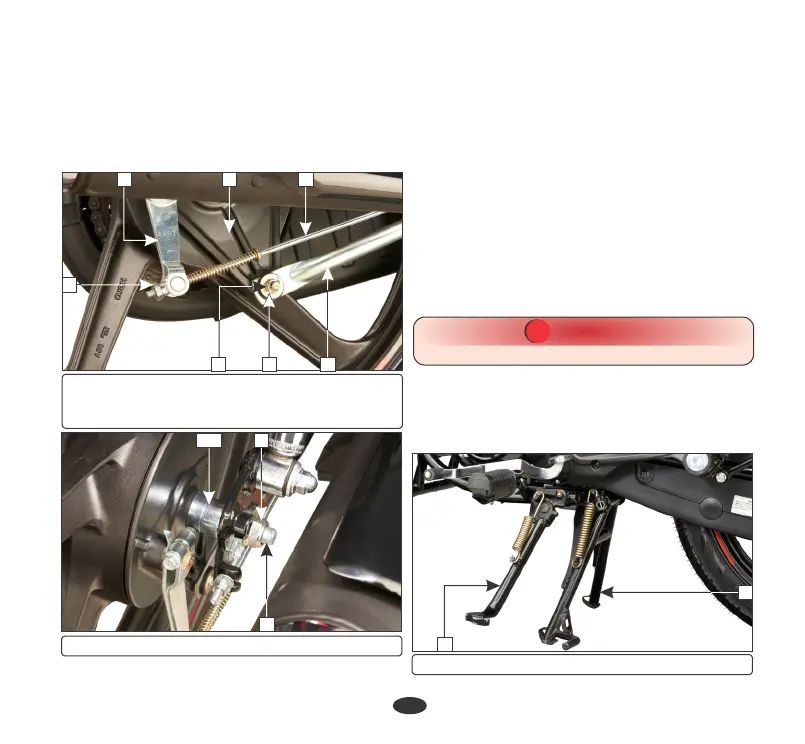
(1) Rear brake adjusting nut (2) Brake rod
(3) Brake arm (4) Brake stopper arm
(5) Brake panel (6) Split pin (7) Lock nut
1
3
(8) Axle nut (9) Axle (10) Collar
8
9
•
Remove the rear brake adjusting nut (1)
and disconnect the brake rod (2) from the
brake arm (3) by pushing down the brake
pedal. Disconnect the brake stopper arm
(4) from the brake panel (5) by removing
split pin (6) and lock nut (7).
Axle nut torque: 5.4 kgf-m.
•
After installing the wheel, apply the brake
several times and check for free wheel
rotation when released.
Brake stopper arm nut torque:
•
Remove the wheel.
Installation
•
Reverse the removal procedure
Ÿ Adjust the rear brake free play (page 42)
and drive chain slackness (page 38).
2.2 kgf-m
•
Remove the rear axle nut (8).
•
Pull out the axle (9) and collar (10).
CAUTION
!!
Always replace used split pins with new ones.
MAIN/SIDE STAND LUBRICATION
•
Park the vehicle on the level surface.
•
Check the main/side stand return spring for
damage or loss of tension.
(1) Main stand (2) Side stand
1
2
6
10






 To Next Page