•
Stop the engine, let the engine oil settle
down and recheck the oil level.
•
Make sure that oil level is at the “UPPER”
level mark of the oil level dipstick with the
vehicle in an upright position and that there
are no oil leaks.
31
CAUTION
!!
•
Running the engine with excessive oil can
cause spark plug fouling & loss in
performance.
•
Engine oil is a major factor affecting the
performance and service life of the engine.
Non-detergent, vegetable or castor based
racing oils are not recommended.
•
Running the engine with insufficient oil can
cause serious engine damage.
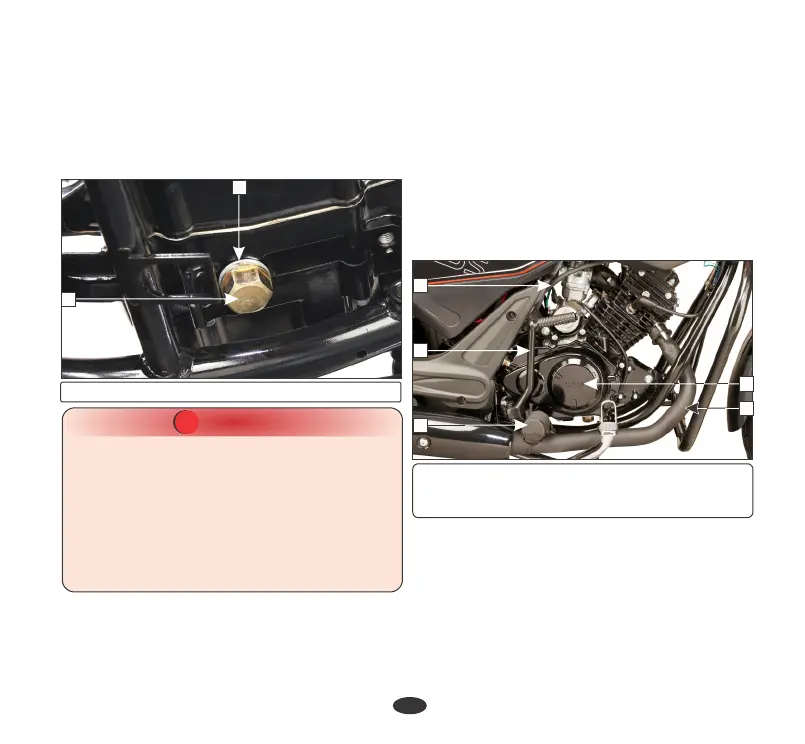
(1) Drain bolt (2) Sealing washer
1
5
4
3
2
1
(1) Clutch cable (2) Kick starter pedal
(3) Rider foot rest (4) Muffler
(5) Right crankcase cover
2
OIL FILTER SCREEN & CENTRIFUGAL
FILTER
•
Drain the engine oil thoroughly.
•
Disconnect the clutch cable (1), Remove
the kick starter pedal (2), remove the right
side rider footrest (3), remove the muffler
(4) and remove the right crankcase cover
(5).
•
Remove the right pillion step cover
(page 51).
•
Remove the oil filter screen (8) and wash it
in clean non flammable or high flash point
solvent (kerosene).
•
Remove the gasket (6) and dowel pins (7).





 To Next Page