45
Removal
WHEEL
(a) Front wheel
•
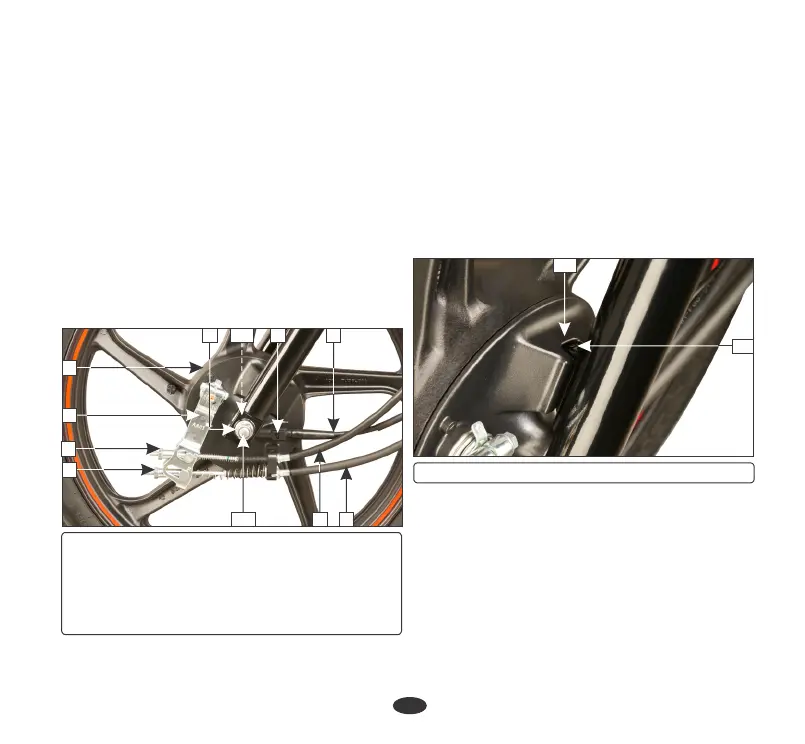
Remove the speedometer cable (1) by
pressing the tab (2) & pulling cable out
from the speedometer gearbox.
•
Support the vehicle securely on the main
stand and raise the front wheel off the
ground.
•
Disconnect the front brake cable (3) and
integrated brake cable (4) from the integrated
brake arm (5) and brake panel (6) by
removing the front brake adjusting nut (7)
and integrated brake adjusting nut (8).
•
Tighten the axle nut.
Installation
•
Remove the axle (10) and side collar (11).
•
Reverse the removal procedure.
•
Install the front wheel by ensuring that the
lug (12) on the left fork is located in the slot
(13) in the brake panel.
Axle nut torque: 5.4 Kgf-m
•
Remove the axle nut (9).
•
Remove the wheel.
12
6
8
3410
119
7
(1) Speedometer cable (2) Tab
(3) Front brake cable (4) Integrated brake cable
(5) Brake arm (6) Brake panel
(7) Front brake adjusting nut
(8) Integrated brake adjusting nut
(9) Axle nut (10) Axle (11) Side collar
(12) Lug (13) Slot
12
13
•
Adjust the front brake free play and integrated
brake free play (page 41 & 42).
•
After installing wheel, apply the brake
several times and check for free wheel
rotation when released.
(b) Rear wheel
Removal
•
Support the vehicle securely on the main
stand and raise the rear wheel off the
ground.
5





 To Next Page