52
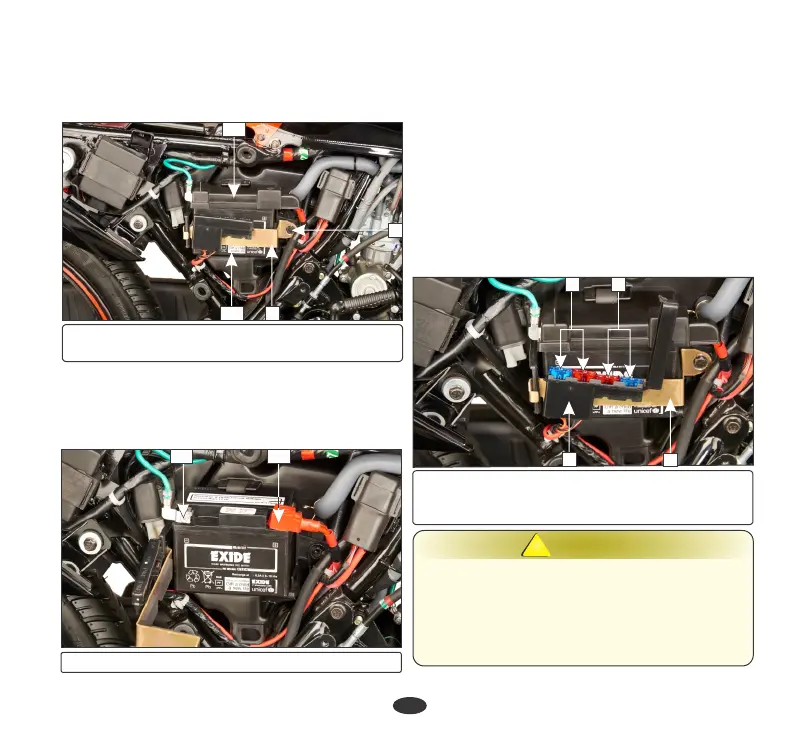
• Pullout the battery from the battery box.
• Disconnect the negative (-)ve terminal lead
(12) from the battery first, then disconnect
the positive (+)ve terminal lead (13).
(12) (-)ve terminal (13) (+)ve terminal
(8) Battery clamp bolt (9) Battery clamp
(10) Battery (11) Battery terminal case cover
9
12
13
8
11
10
• Pull the battery (10) out slightly and
remove the battery terminal case cover
(11).
FUSE REPLACEMENT
•
Check all fasteners are secured properly.
Battery installation
In circuit fuse (3) : 15A, 10A
Fuse box (1): Location: Mounted on the
battery clamp (2).
Spare fuse (4) : 15A, 10A
•
Reinstall in the reverse order of removal. Be
sure to connect the positive (+)ve terminal
first, then the negative (-)ve terminal.
Fuse type: Blade fuse
WARNING
!!
•
Never use a fuse with a different rating from
that specified. It may lead to serious damage
to the electrical system or a fire due to short
circuit.
•
Battery gives off explosive gases. Keep
sparks, flames & cigarettes away.
3 4
1
2
(1) Fuse box (2) Battery clamp
(3) In circuit fuse: 15A &10A
(4) Spare fuse: 15A & 10A






 To Next Page