Creating an Administrator
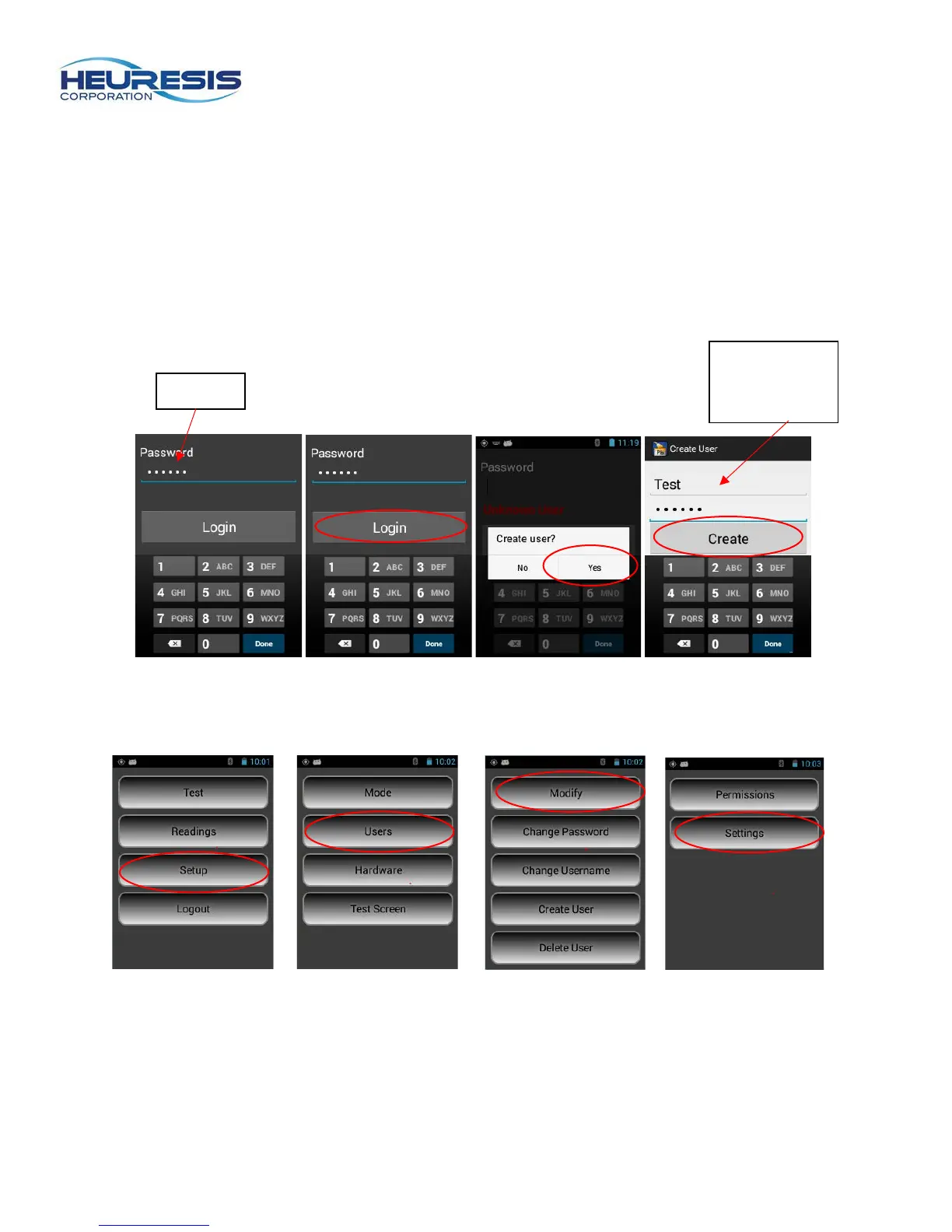
When first logging on to the Pb200i, you will need to create a user & password. Start by using the factory
default password: 371945. (This password is also included on the Pb200i packing list).
You will then be prompted to create a user. This person will be a super user/administrator, and can
administer rights to other users as needed. This person should be a high-level employee, responsible for
the instrument, such as the radiation safety officer (RSO).
Login using the default password. When prompted to “create user?” select yes. Enter the text for your
new password. Then login using the new password. (Figure 49 to 52).
Caution: User names must be a minimum of four characters, and a maximum.
Passwords must be a minimum of six characters.
Figure 49 Figure 50 Figure 51 Figure 52
To view the rights of the administrator, return to the main menu. Select setup, followed by users, then
modify and finally settings. (Figure 53 to 56)
Figure 53 Figure 54 Figure 55 Figure 56
and



 To Next Page