Stop at Set Level
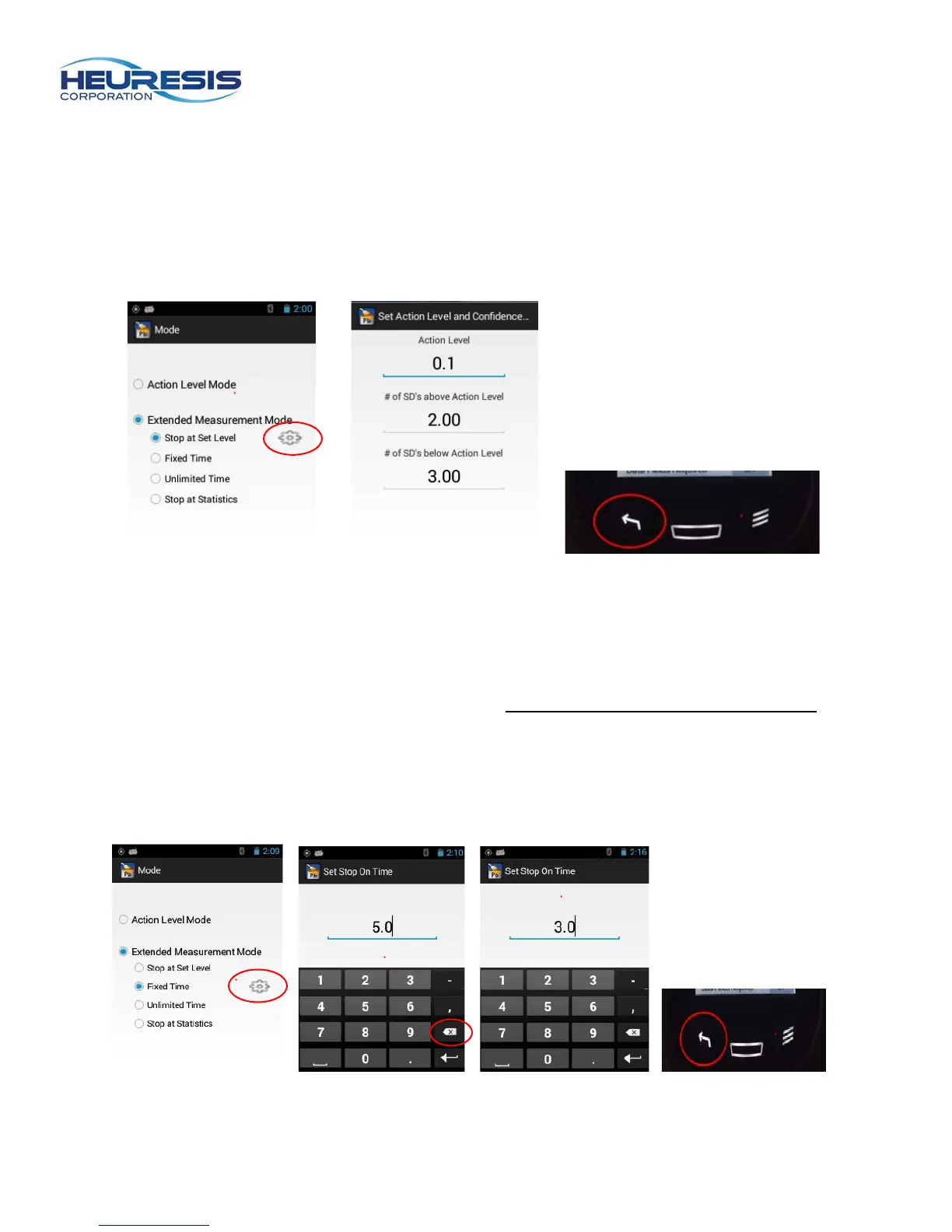
Stop at Set Level mode allows the user to set up the instrument with three variables: action level, number
of standard deviations above the action level, and number of standard deviations below the action level.
Once these preset thresholds have been reached, the instrument will stop taking a reading and display
the result.
To setup this mode, start at the main menu. Select setup, then mode, then “Extended Measurement
Mode.” Select “Stop at Sea Level” and back out with the left arrow. (Figure 102 to 104)
Figure 102 Figure 103 Figure 104
Fixed Time
Fixed Time mode allows the user to set a maximum time the instrument will take a reading with the trigger
depressed. Once the instrument reaches this set time, it will stop taking data and display a result. The
value of time that can be entered is in real time seconds, up to a maximum of 300 seconds (5 minutes).
This mode is often employed when users are following a strict standard operating procedure (SOP) that
prescribes the length of each reading that must be taken on a given project.
To setup this mode, start at the main menu. Select setup, then mode, then Extended Measurement Mode
and then “Fixed Time.” Enter the desired time limit, then back out with the left arrow. (Figure 105 to 108)
Figure 105 Figure 106 Figure 107 Figure 108


 To Next Page