23
when processing large I/O requests. Multiple physical drives working in parallel increases the
throughput, meaning better performance.
For smaller I/O requests (512 bytes to 4 kilobytes), it is better to have each individual disks handle
their own I/O request, improving the IOPS (I/O per second), rather than having one tiny I/O request
being handled by multiple disks.
A block size of 64k is recommended because it strikes a balance between the two I/O usage scenarios.
Capacity (Default: Maximum)
The total amount of space you want the RAID array to take up. When creating RAID levels, disk
capacities are limited by the smallest disk. For example, consider the following
You have 3 drives connected to the enclosure.
The first drive is 6 TB, the second is 4 TB, and the third drive is 2 TB.
After creating a RAID level 5 using all three drives and maximum capacity, the first drive will have
4 TB, the second 2 TB, and the third drive 0 TB of free capacity
The free capacity on the first and second drive can be used to create a separate array.
You may also choose how much space each array will utilize. You can use the remaining space to
create another array (up to 4 arrays are supported).
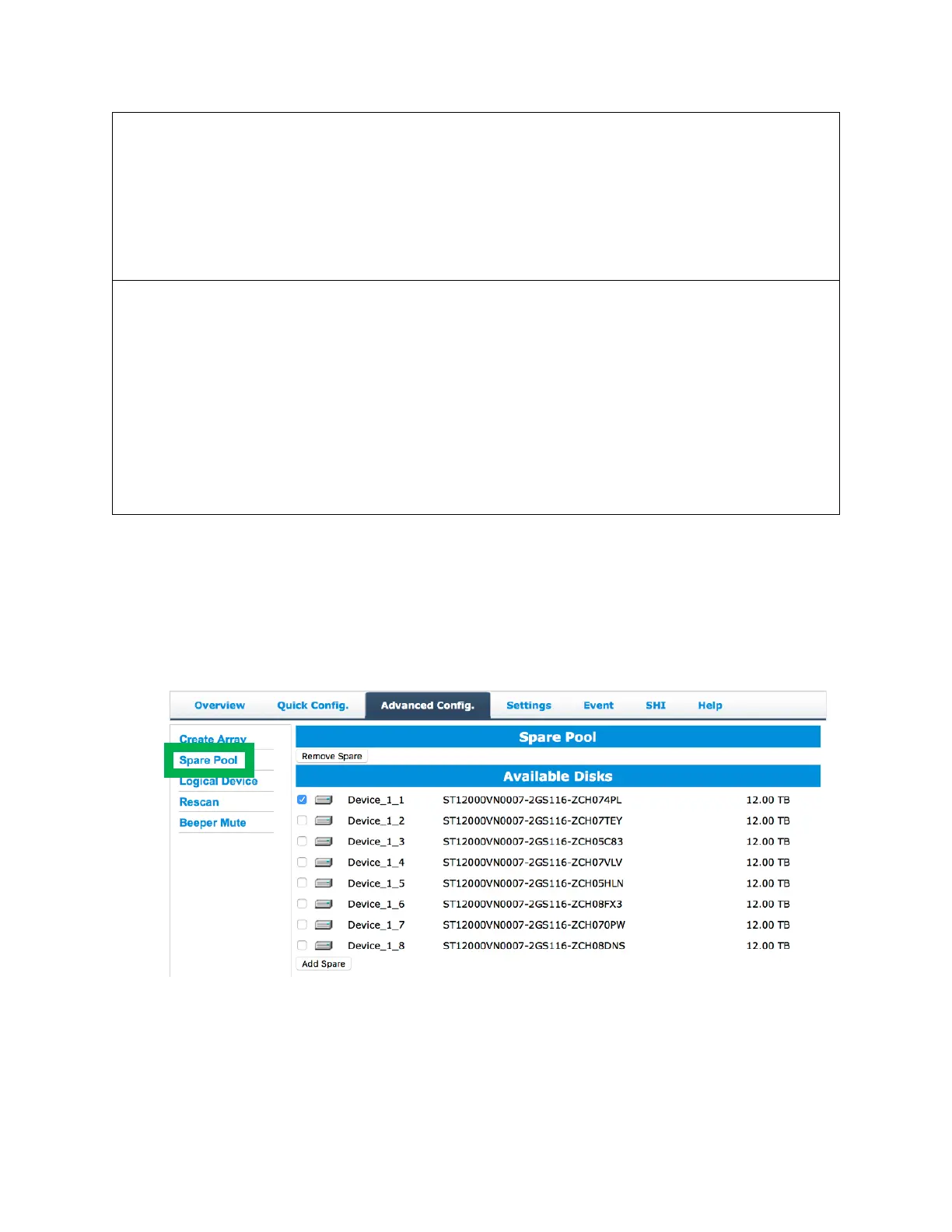
Spare Pool
Spare disks are physical disks that will immediately replace critical disks in an array.
To add spare disks:
1. Click Advanced Config.
2. Click Spare Pool
3. Check the box for the disk you want as a spare under Available Disks.


 To Next Page