Digital Series Light Controller User Manual
47
7.3 Light Source Control
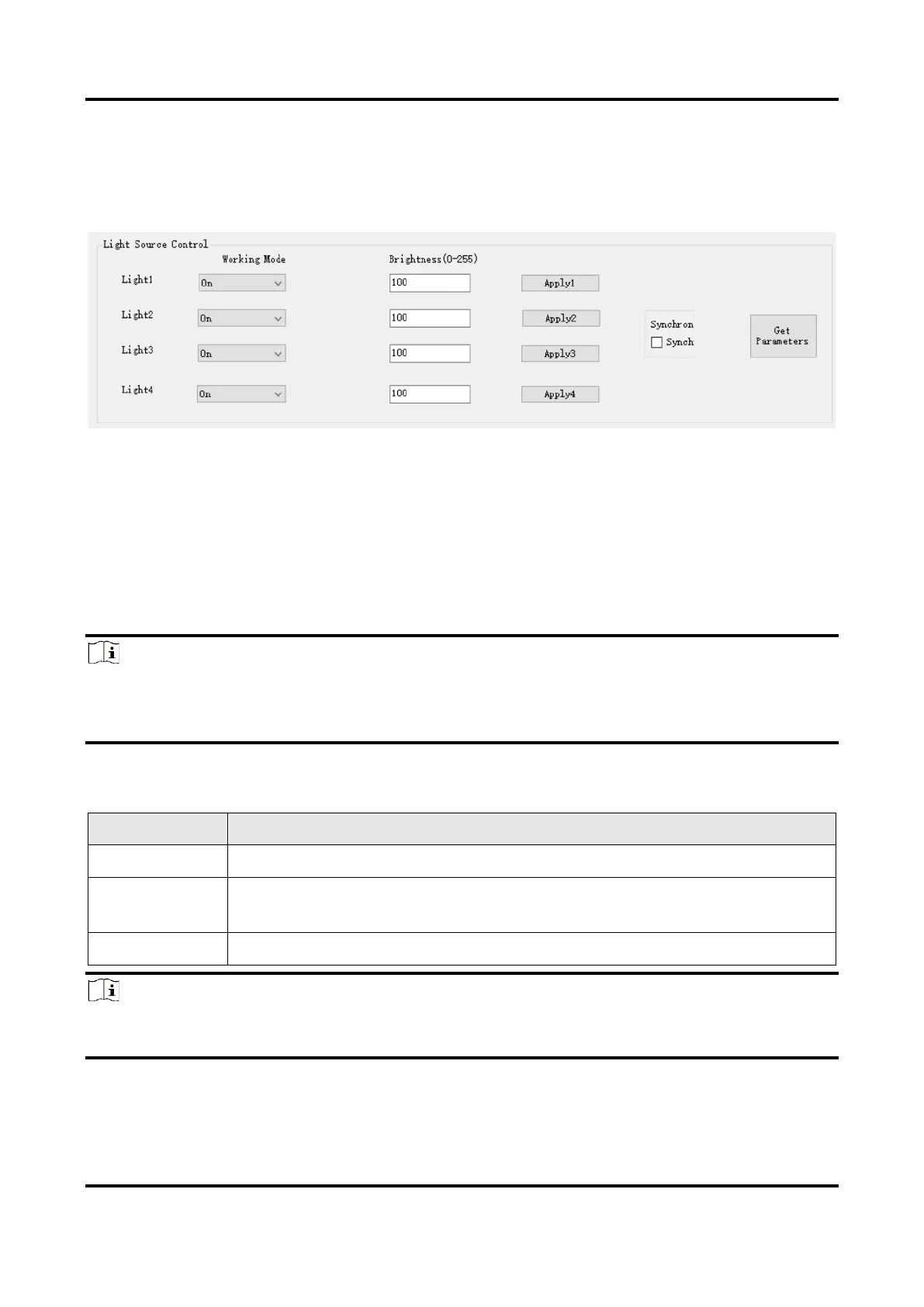
You can set the brightness and working mode of the light source in the light source control
area.
Figure 7-6 Light Source Control
Before You Start
Make sure that related wirings are completed and light source devices are connected.
Steps
1. Click Get Parameters to get the current parameters of the light source.
2. Select light source from Light Source 1 to Light Source 4 corresponding CH1 to CH4
according to actual demands.
Note
●
The type I device has four light source interfaces (CH1 to CH4).
●
The type II, IV, V and VI devices have two light source interfaces (CH1 to CH2).
●
The type III device has six light source interfaces (CH1 to CH6).
3. Select Working Mode according to actual demands.
Table 7-2 Working Mode Description
Note
●
Type II, IV, V and VI devices support input 1/2 corresponding IN 1 and IN 2.
●
Type III device supports support input 1/2/3/4/5/6 corresponding IN 1/2/3/4/5/6.
4. Set Brightness according to actual demands, and it ranges from 0 to 255.
5. Click Apply Light Source to let the device execute configured parameters.


 To Next Page