Digital Series Light Controller User Manual
50
7.6 Timer
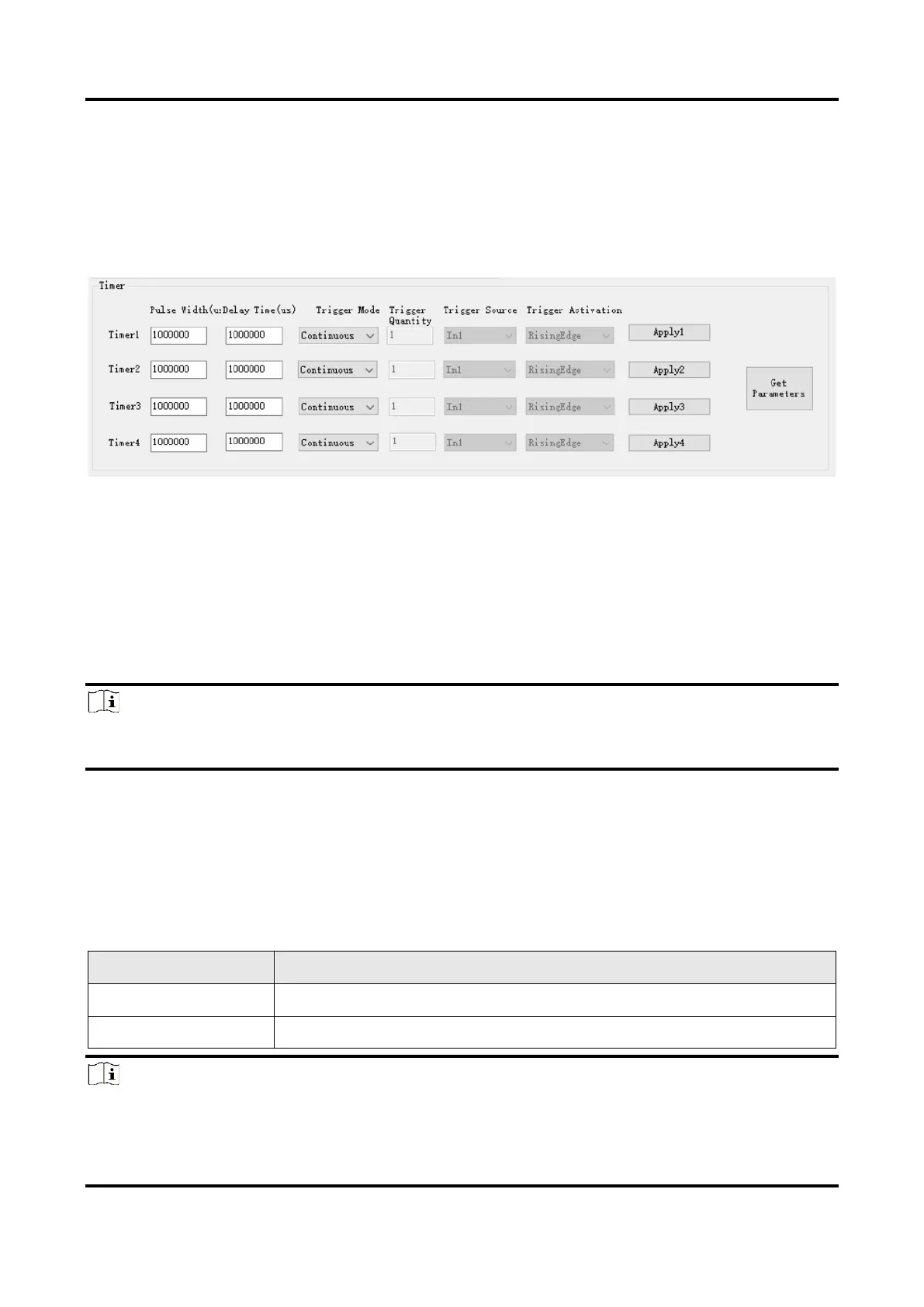
The timer acts as an internal clock and provides a continuous square wave based on trigger
conditions. When the device’ trigger source selects the timer, the device will generate the
corresponding trigger square wave according to the configured delay time and pulse width
to delay the trigger of the external device.
Figure 7-9 Timer Trigger
Before You Start
Make sure that related wirings are completed and light source devices are connected.
Steps
1. Click Get Parameters to get the current timer’s parameters.
2. Select Trigger Mode according to actual demands, including continuous and
discontinuous mode.
Note
In the continuous mode, the light source will strobe flash continuously. While in the
discontinuous mode, the light source will strobe flash based on specific number.
3. Set Pulse Width and Delay Time according to actual demands.
4. Set following parameters when the trigger mode is discontinuous.
●
Trigger Quantity: It sets the light source’s quantity of strobe flash.
●
Trigger Activation: It sets the trigger activation of the timer, including rising edge and
falling edge.
●
Trigger Source: It sets the trigger signal source of the timer.
Table 7-4 Trigger Source of Timer



 To Next Page