73
connection; please select IP cameras for configuration.
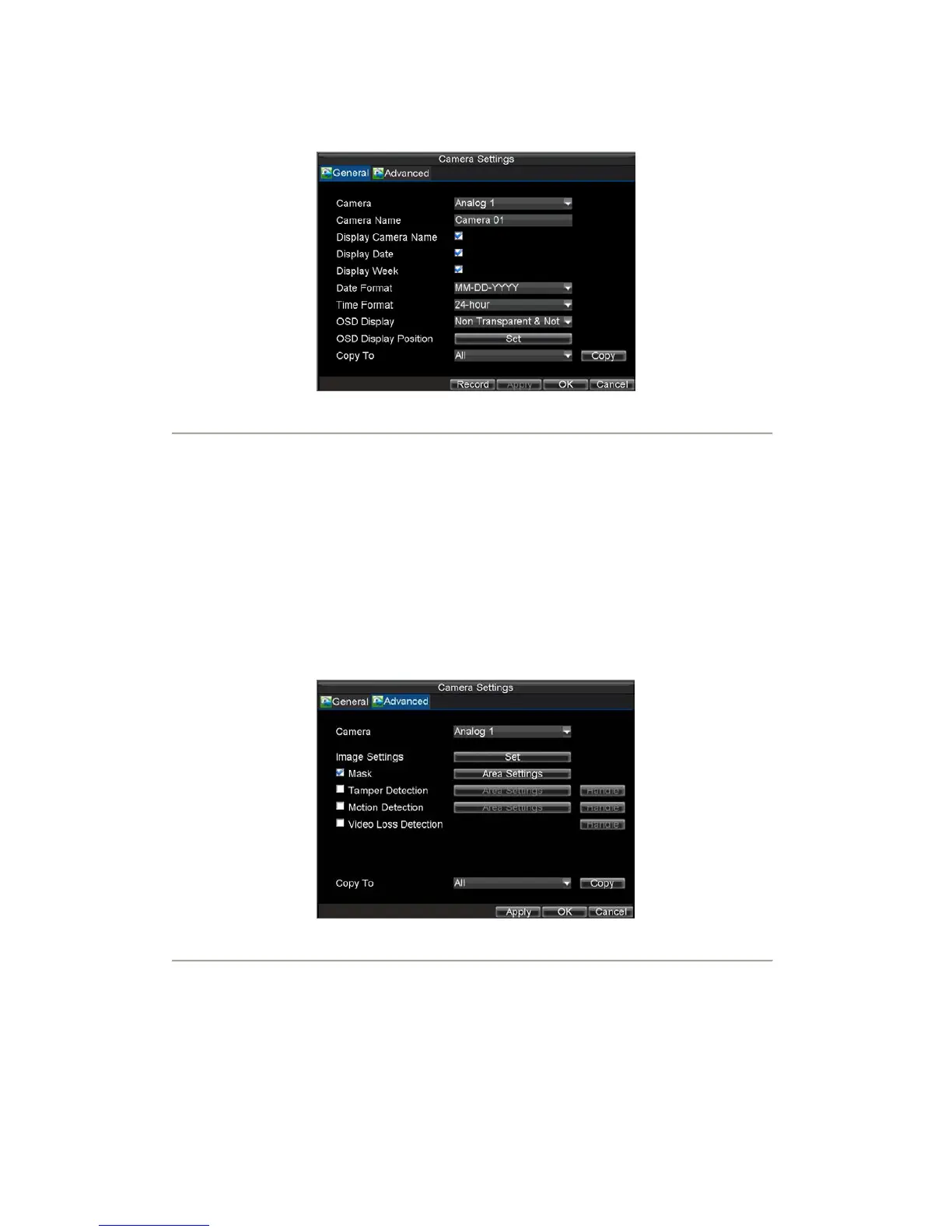
3. Configure desired OSD settings, as shown in Figure 6.
Figure6. OSD Settings Menu
Set up Privacy Mask
You may setup privacy mask to mask off sensitive or private areas in the field of view of a camera.
To setup privacy mask:
1. Click Menu > Settings > Camera to enter the Camera Settings menu, shown in Figure 1.
2. Select channel to setup privacy mask under Channel No., and click the Set button.
Note: DS-7604NI-S/M, DS-7604NI-S and DS-7608NI-S models provide no analog camera
connection; please select IP cameras for configuration.
Select the Advanced tab to enter the Advanced Camera Settings menu, shown in Figure 7.
Figure7. Advanced Camera Settings Menu
3. Check the Mask checkbox to enable feature.
4. Click the Area Settings button to enter Area Settings menu.
5. Set mask area, as shown in Figure 8. Up to 4 areas can be set.









 To Next Page