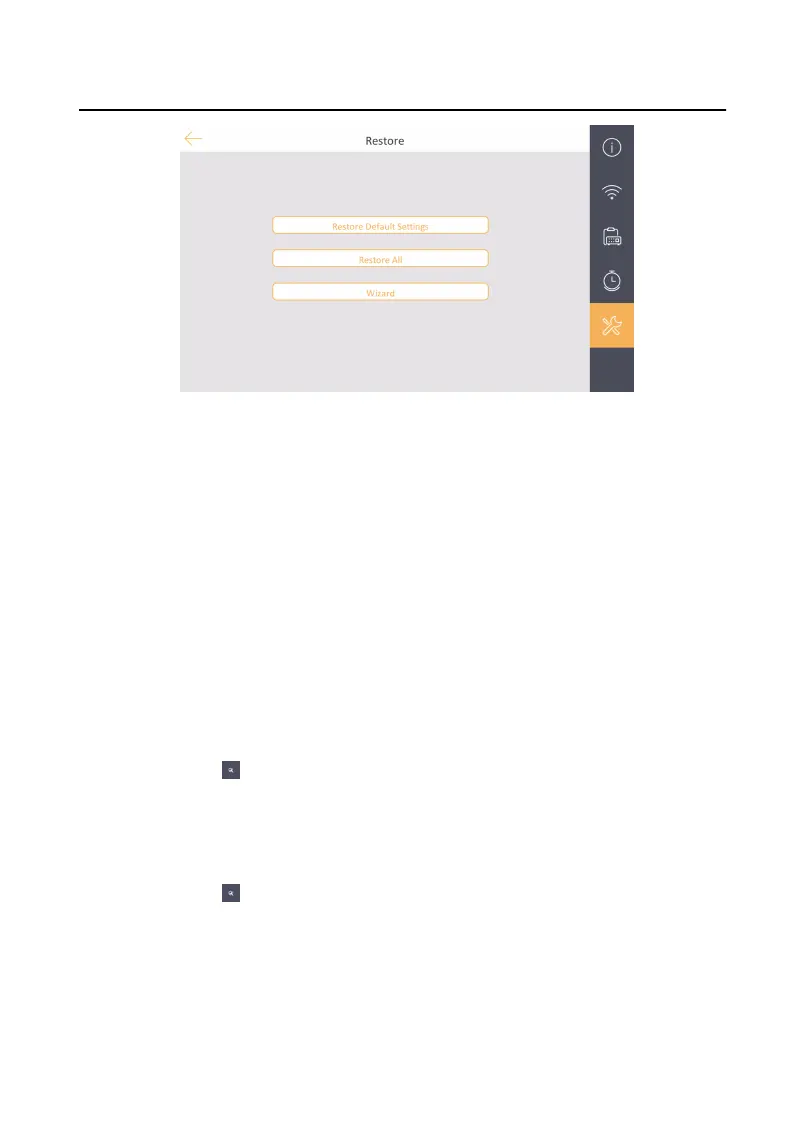
Figure 2-15 Restore Sengs
3.
Restore the indoor staon. You can choose from restore default sengs or
restore all sengs.
-
Tap Restore Default
Sengs to restore the default sengs and reboot the
system.
-
Tap Restore All to restore all sengs to factory parameters and reboot the
system.
2.8 System
Sengs
You can also view the device informaon, set the system the language, the
brightness, reboot, upgrade, auto-answer, and do not disturb funcon.
View Device
Informaon
Tap Sengs → to enter the page.
You can view the Model, Version, and Serial No..
Time
Sengs
Tap Sengs → → Time to view and change the system me.
Clean Screen
Enable the clean screen funcon and the screen will be locked for 30 s. In
the me duraon, you can clean the screen surface. Hold the disable icon or
wait for 30 s to end the status.
Network Indoor
Staon Conguraon Guide
15


 To Next Page
 Loading...