Page 62 171051(9) - Hill-Rom® 900 Electric Bed User Manual
PROPRIETARY AND CONFIDENTIAL DRAFT: May 18, 2018
This function is used in emergencies (e.g.: reanimation, cardiac massage) or in
the event of a power cut.
It is operated by a handle located centrally and bilaterally under the sleep surface
or under the head section, if the bed is fitted with half-siderails.
The head section actuator is automatically re-enabled after the yellow CPR
handle is released. Never use CPR to raise the head section.
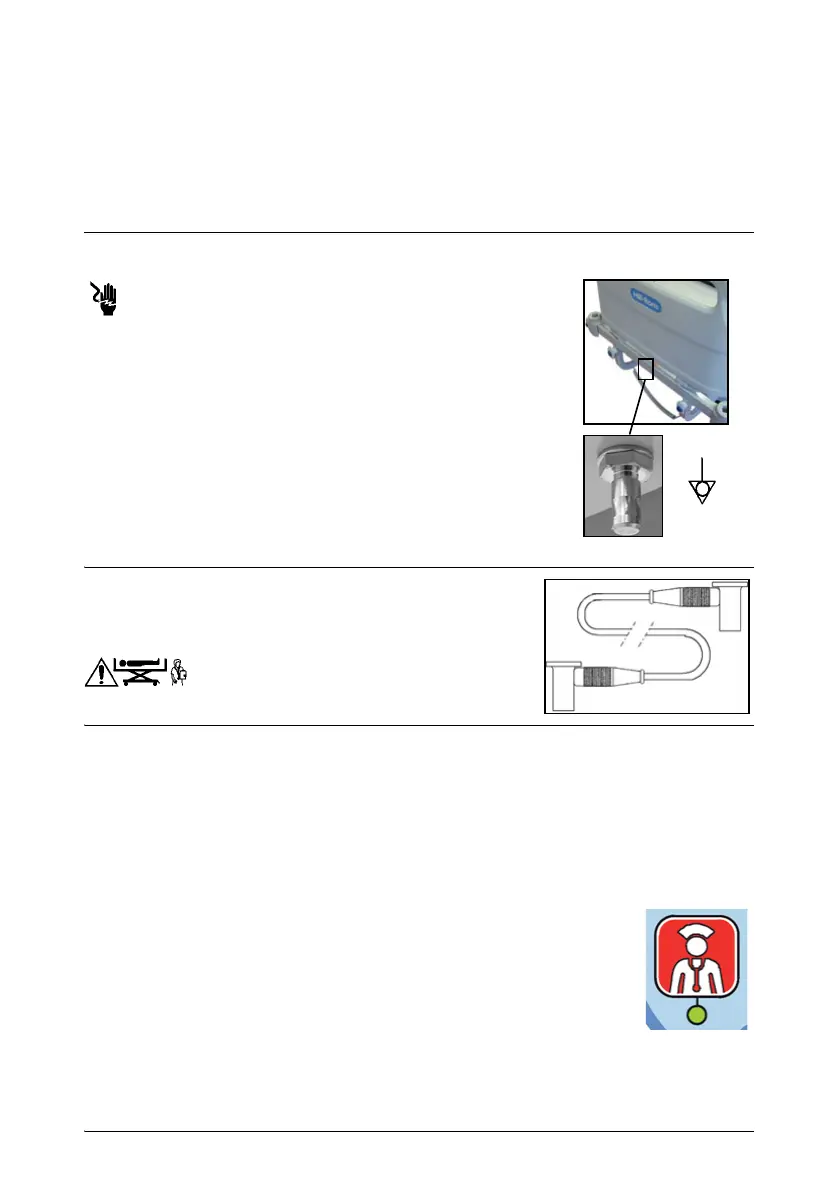
Equipotential terminal
Failure to connect the equipotential cable may result in
corporal injury.
When direct intravascular or intracardiac connections
are in use, the electric potentials of all the unprotected
metal parts need to be equalized.
The bed must be connected to the electrical installation.
To equalize potentials if a grounded power connection is
unavailable, connect the equipotential cable (AC968A) to
the connection terminal on the bed and the device.
Equipotential cable (AD968A)
It is fitted with two POAG-WB 6 DIN type connectors
and a 2 m long yellow and green cable.
Nurse call*
Use the controls on the patient keypads, the caregiver keypads or the control
pendant* to activate the “Nurse call” function.
Check that the cable connecting the bed to the hospital’s communications
system is connected.
To Activate:
• Press a Nurse call control.
• The light under the Nurse call symbol flashes for 1 minute. If
the system acknowledges reception of the call during this
time, the light turns green. Otherwise, it goes out
automatically.
• The light goes out if the caregivers confirm reception of the
call.
If the bed detects a connection fault (cable not connected or fault), a
discontinuous signal sounds if the nurse call control is activated.








 To Next Page