*2235450*
2235450 English 13
6.8 Hammer drilling
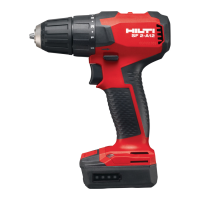
SF 2HA12
1.
Set the function selector ring to the “hammer drilling” position .
2. Set the forward/reverse switch to the “forward” position.
6.9 Switching on
▶ Press the control switch.
➥ Speed of rotation is regulated by the distance the control switch is
pressed in.
6.10 Switching off
▶ Release the control switch.
6.11 Removing the accessory tool
1. Set the forward/reverse switch to the middle position or remove the
battery from the power tool.
2. Open the keyless chuck.
3. Pull the accessory tool out of the chuck.
7 Care and maintenance
WARNING
Risk of injury with battery inserted !
▶ Always remove the battery before carrying out care and maintenance
tasks!
Care and maintenance of the tool
• Carefully remove stubborn dirt.
• Clean the air vents carefully with a dry brush.
• Use only a slightly damp cloth to clean the casing. Do not use cleaning
agents containing silicone as these can attack the plastic parts.
Care of the Liion batteries
• Keep the battery free from oil and grease.
• Use only a slightly damp cloth to clean the casing. Do not use cleaning
agents containing silicone as these may attack the plastic parts.
• Avoid ingress of moisture.
Maintenance
• Check all visible parts and controls for signs of damage at regular intervals
and make sure that they all function correctly.
• Do not operate the product if signs of damage are found or if parts
malfunction. Have it repaired immediately by Hilti Service.
Printed: 19.09.2019 | Doc-Nr: PUB / 5509387 / 000 / 01

 To Next Page
 Loading...