FRONT PANEL COMPONENTS | PAGE 5
2. FRONT PANEL COMPONENTS
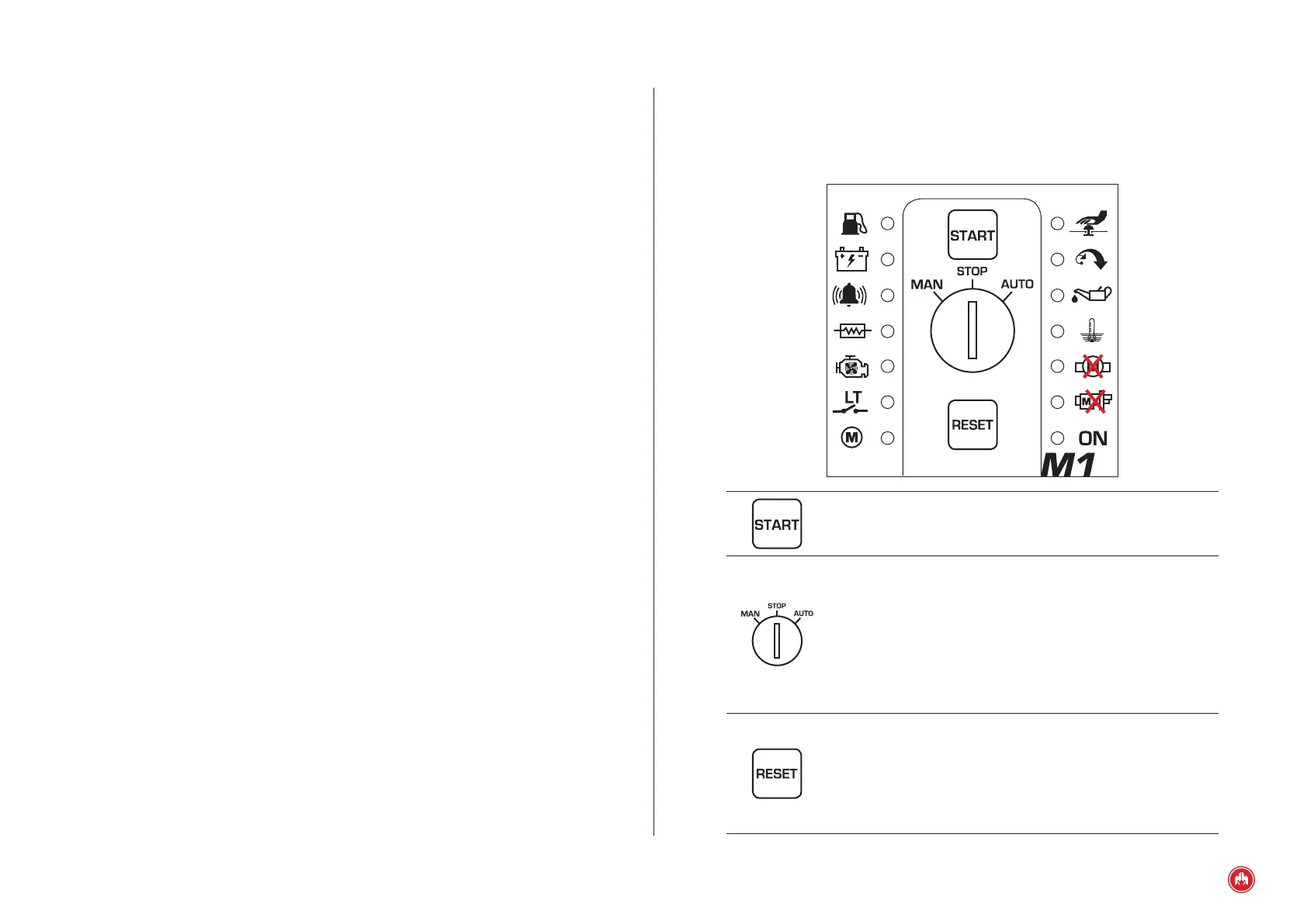
The control unit acts as protection of a diesel engine with the possibility of carry-
ing out the start-up manoeuvre. Note the following elements at the front:
Start/Stop button. This allows you to start and stop the
engine when you have selected the manual mode.
Mode Selection Knob (MAN STOP AUT). In the "MAN”
position, the control unit will give the direct order to start up
(performing 1 start-up attempt). In the "STOP" position, the
control unit will order the genset to stop. In the "AUT”
position, the control unit will stay in automatic mode and will
operate as follows: if the "LT" earth contact is closed, the
control unit will order it to start up and if the contact is
opened, it will order it to stop.
RESET button. This allows you to restart the control unit’s
operation cycle and delete alarm notications. If you hold the
reset button for ve seconds, with the engine running, it
memorizes the engine speed and it activates the overspeed
control. If you press and hold it for ve seconds with the
engine turned off, the overspeed control is disabled.



 To Next Page