12
3. Flashing display of BP data in flash memory for 3 seconds;
4. A "beep" sound.
4.2 Installing System
Hardware requirements
Computer with CD drive, minimum display resolution: 1024*768, an USB port.
Software requirements
Microsoft Windows 2003, Windows XP or advanced Windows versions
Install the software
Hingmed ABPM software components include:
● Hingmed ABPM User Guide of PC-end software
● Hingmed ABPM PC software CD
Power on your computer, and place the CD into the CD drive, the application guide will
display on screen after automatically running of CD.
If the CD cannot run automatically, operate as following steps:
a) Open “My computer” or “Computer”;
b) Click CD to drive and find HingMed installation software of server version or
stand-alone version by your demand. “”
c) Double-click the installation program and operate by following instructions →“Next”
→ “Next”, choose the language item (Chinese or English) you need on the pop-up
window, installation confirmation message will pop up again, click “Next” to install,
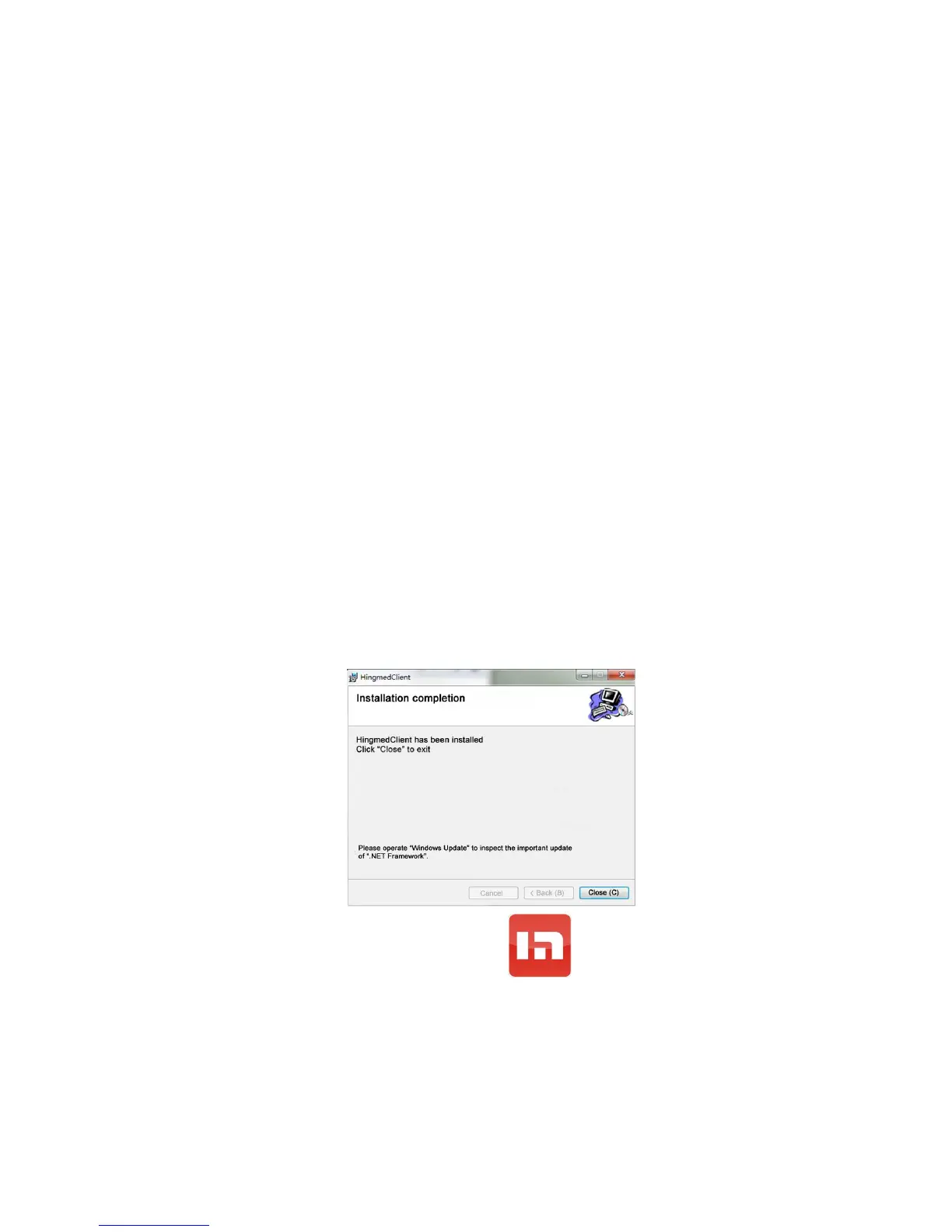
figure below will pop up after finishing installation, finally click button “Close”:
After the accomplishment of installation, an icon will display on your computer
screen, which indicates that you have installed successfully the PC software of Hingmed
Ambulatory blood pressure monitor.
ATTENTION: USB cable should disconnect with computer when installing Hingmed
ABPM software.


 To Next Page