14
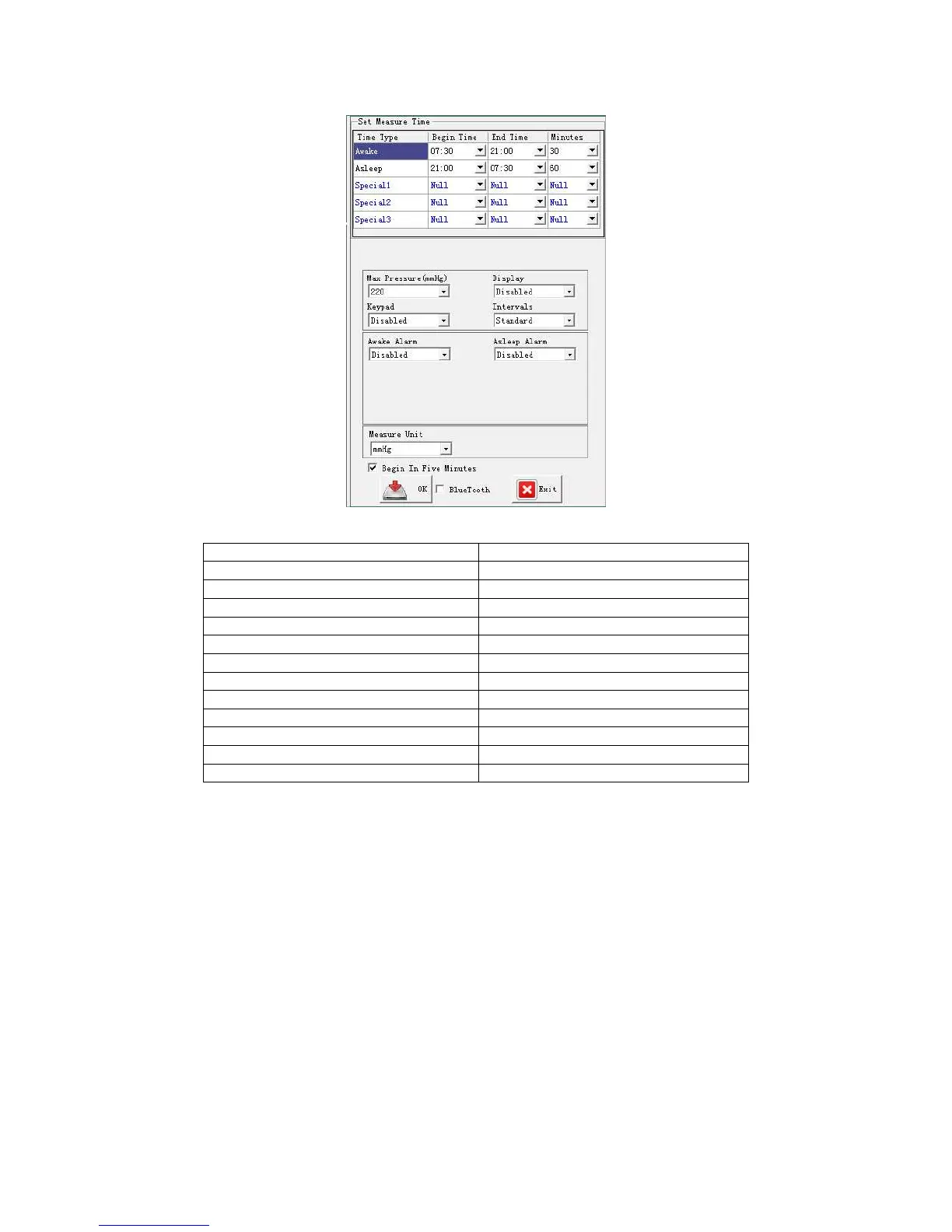
●The parameters setting see the following table:
Time type Daytime, Nighttime, Special time
Maximum pressure 120-280mmHg
Keyboard Enable / Disable
Display Enable / Disable
Daytime alarm Enable / Disable
Nighttime alarm Enable / Disable
Maximum systolic blood pressure 100-200mmHg
Minimum systolic blood pressure 60-90mmHg
Maximum diastolic blood pressure Enable / Disable
Minimum diastolic blood pressure 90-180mmHg
Minimum diastolic blood pressure 30-70mmHg
Unit mmHg/kpa
Interval Standard / Fixed
4.3.4 Cuff selection and connection
Wear Hingmed ABPM and cuff for patient:
After successfully programming by Hingmed ABPM software, then wear ABPM and cuff
for patient, either arm can be wore.
a) Select cuff of suitable size
Select cuff of suitable size and wrap it on the upper arm of patient against slipping. The
“Range” and boldfaced “Index” signs are used to check the fitness of cuff size to arm.
The arrow icon “Index” should be within the icon of “Range”, if not, change another size
of cuff.
Note: 1 Improper size of cuff will lead to error of readings and affect the accuracy
of measuring.
2. Do not wrap the cuff on the diseased skin directly, you’d better wrap a


 To Next Page