14
STEP 4 Use Your Remote
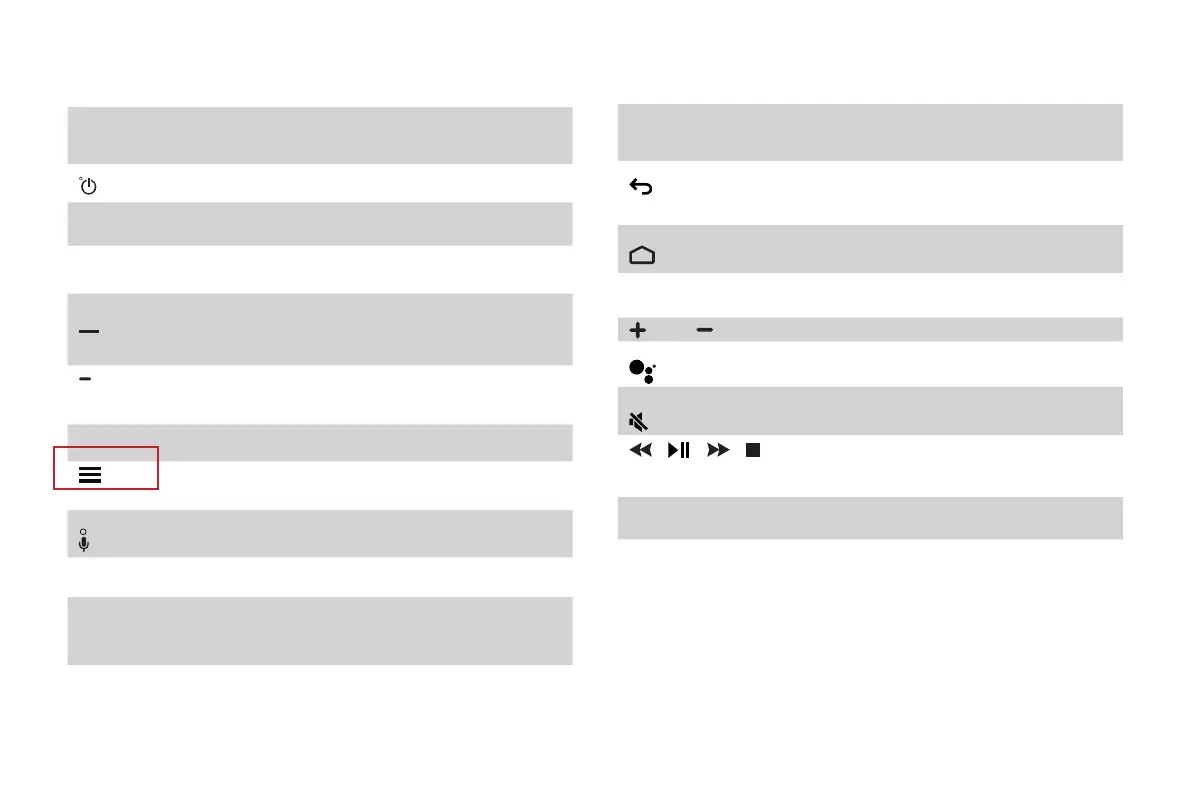
BUTTON DESCRIPTION
Power on / off
INPUT Change Laser Cinema input source
Number Enter Channels / input numbers
Dash button / Select a digital sub-
channel
(Red / Green /
Yellow / Blue)
Special function buttons
TV Return to the previous source
The button for the Quick setup
menu
Power Indicator and Microphone
OK Confirmation button
˄ / ˅ / ˂ / ˃ D-pad (up/down/left/right
navigation buttons)
BUTTON DESCRIPTION
Return to the previous place in the
menu or app
Display the Home screen
APPS All Apps
VOL Volume (up/down)
Google Assistant of Laser Cinema
Mute and restore sound
/
/
/
Media content control function
buttons
NRT Quick access to Accessibility menu
NOTE: The button descriptions are only provided as a
reference. The actual appearance of your remote may
differ from the buttons that are listed.










 To Next Page