Do not use the cook top as a work surface or cutting
board.
Do not cook food directly on the cook top. Always
use the proper cookware.
8. OVEN FUNCTION
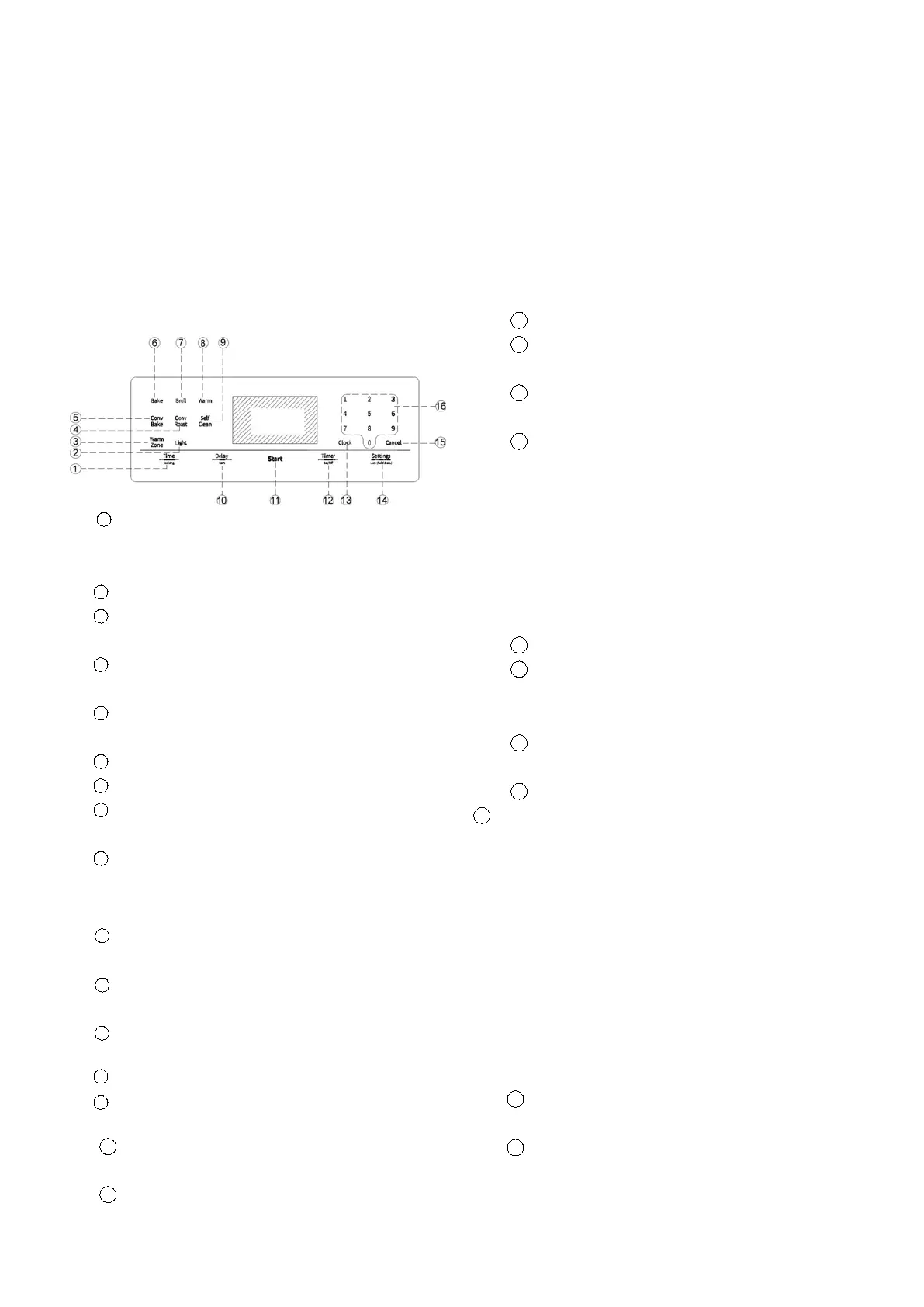
(1) The oven control panel
READ THE INSTRUCTIONS CAREFULLY BEFORE USING THE
OVEN. For satisfactory use of your oven, become familiar
with the various features and functions of the oven as
described below. Detailed instructions for each feature
and function follow later in this user manual.
1
Time Cooking: Touch and then use the number
pad to
set the amount of time you want your food to cook.
The oven will shut off when the cooking time has run out.
Light: Use to turn the oven light on or off.
Warm Zone:Use to open the radiant surface keep hot
elements.
Convection Roast: Use to select the Convection Roast
function.
Convection Bake: Use to select the Convection Bake
function.
Bake: Use to select the Bake function.
Broil: Use to select the Broil function.
Warm: Use to select the warm function to keep cooked
foods.
Self Clean: Use to select the Self- cleaning function.
While Self-cleaning is running in one oven, you cannot
use any other oven functions and cooktop.
10
Delay Start: Use to set the oven to start
automatically at a time you set.
11
START: Use to start any cooking or cleaning
function in
the oven.
12
Timer 0n/Off: Use to set or cancel the kitchen
timer. The
Kitchen timer does not start or stop cooking.
13
Clock: Use to set the time of day.
14
Settings/Lock(hold 3 sec): Use to set oven functions
and lockout.
15
Cancel: use to cancel a previously entered
temperature or time.
16
Number pad: use to set any function requiring
numbers such as the time of day on the clock, the timer,
the oven temperature, the start time, and the length of
operation for timed baking. Etc.
(2) Setting the clock
The time can only be set when the range is in standby
mode.
The time of day cannot be changed during timed
cooking,delay-timed cooking, or a self-cleaning cycle.
You can choose between a 12-hour or 24-hour display.
The default is 12-hour.
How to set the Clock
1 Touch Clock.
2 Touch Clock to select AM or PM. (Skip this step
If you are setting the Clock to 24 hour display mode)
3 Touch keys in the number pad to set the
current time of day.
4 Touch START to save the changes
(3) Setting the kitchen timer
The kitchen timer serves as an extra timer that will beep
when the set time has elapsed. It does not start or stop
cooking functions. You can use the kitchen timer with
any of the other oven functions.
How to set the timer
1
Touch Timer 0n/Off.
2
Touch number keys in the number pad to set
the hours and minutes. The timer can be set for any
amount or time from 1 minute to 12 hours.
3
If you make a mistake, touch Cancel, and then
enter the amount of time again.
4
Touch START.
5
When the set time has elapsed, the oven will
beep
and the display will show End until you touch Timer 0n/
Off. You can cancel the timer at any time by touching
Timer on/Off.
(4) Time Cooking
In Timed Cooking mode, the oven turns on immediately
and COOKS for the length of time you select. At the end
of the cooking time, the oven turns off automatically.
You can use the Timed Cooking only with another
cooking operation (Convection Bake, Convection
Roast, Bake,kepp warm.)
How to set the oven for Time Cooking
1 .Touch the pad for the cooking operation you
want,. eg. Bake.
2 .Enter the temperature you want, for example,
400 °F, using the number pad. (The default
temperature Is 350℉).
NOTE: Press clock to check the time under heating.


 To Next Page