3
Touch Time Cooking. Enter the number of
hours/minutes you want the oven to stay on using the
number pad. You can set the cooking time for any
amount or time from 1 minute to 12 hours .
4
Touch START to begin cooking. The
temperature
display will start to change once the oven temperature
reaches 100
℉
.
The oven will continue to cook until the set amount of
time has elapsed, then turn off automatically unless you
set the Keep Warm feature. (Refer to the Using Keep
Warm section on page 30) .
When Timed Cooking is done, the oven will beep 3 times.
CAUTION
Use caution with the T
ime Cooking or Delay Start
features. You can use these features to cook cured or
frozen meats and most faults and vegetables. For food
that can easily spoil, such as milk, eggs, and unfrozen or
fresh fish, meat, or poultry, chill them in the refrigerator
first. Even when chilled, they should not stand in the
oven for more than 1 hour before cooking begins, and
should be removed promptly when cooking is completed.
Eating spoiled food can result in sickness from food
poisoning.
(5) Delay Start
With Delay Start, the oven's timer turns the oven on and
off at times you select In advance.
You can use the Delay Start only With another
cooking operation (Convection Bake, Convection Roast,
Bake, Broil ).
You can set the oven for a delay start before
setting other cooking operations.
How to set the oven for delay start
1
Position the oven rack(s) and place the food in
the oven.
2
2 Touch the pad for the cooking operation you
want, eg. Bake.The default temperature is 350
℉
.
3
Enter the temperature you want, eg.375
℉
,
using the number pad.
4
Set the cooking time If you want. (Refer to the
section on the timed cooking feature on page 21).
5
Touch Delay Start. Use the number pad to set
the time.
6
Touch START. The oven will begin to cook.
(6) Turning the light on and off
The oven light turns on and door light turns off
automatically when the door is opened.
The oven light turns off automatically when the
door is closed.
You can turn the oven and door light on and off
manually by touching the Light.
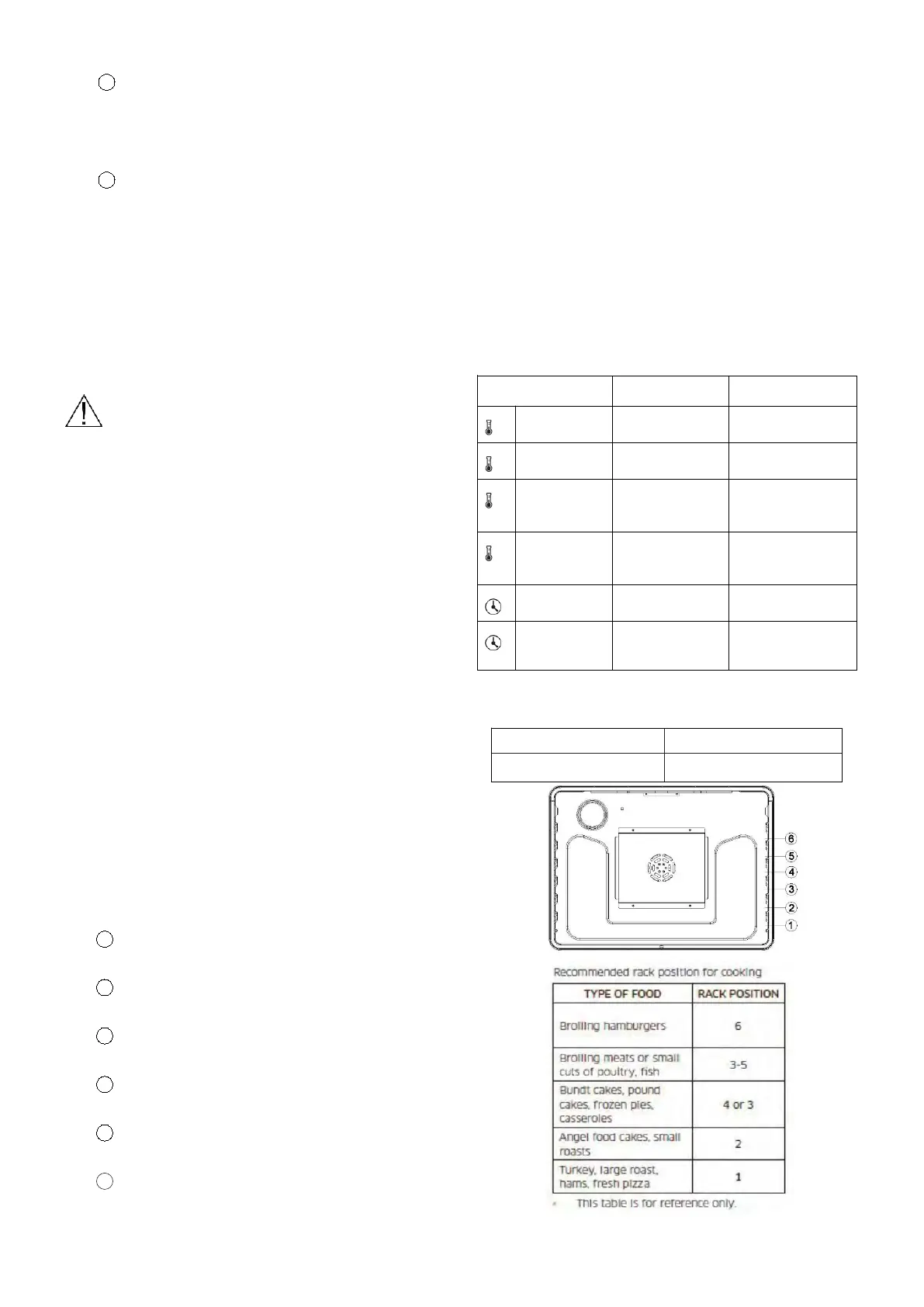
(7) Minimum and maximum settings
All o
f the features listed in the table below have
minimum and maximum time or temperature settings. A
beep will sound each time a pad on the control panel is
pressed and the entry is accepted. An error tone will
sound in the form of a long beep if the entered
temperature or time is below the minimum or above the
maximum setting for the feature.
FEATE MINIMUM MAXIMUM
Bake 150 °F (65 °C) 550 °F (285 °C)
Broil LO HI
Convection
Bake
150 °F (65 °C) 550 °F (285 °C)
Convection
Roast
150 °F (65 °C) 550 °F (285 °C)
Self Clean 2 Hr. 5 Hr.
Keep
Warm
1 Min
3 Hr.
(8) Using the oven racks
Ove
n rack position
Type of Baking Rack Positions
Cakes and cookies 3 and 5


 To Next Page