Smart Functions
Getting Familiar with the Home Screen
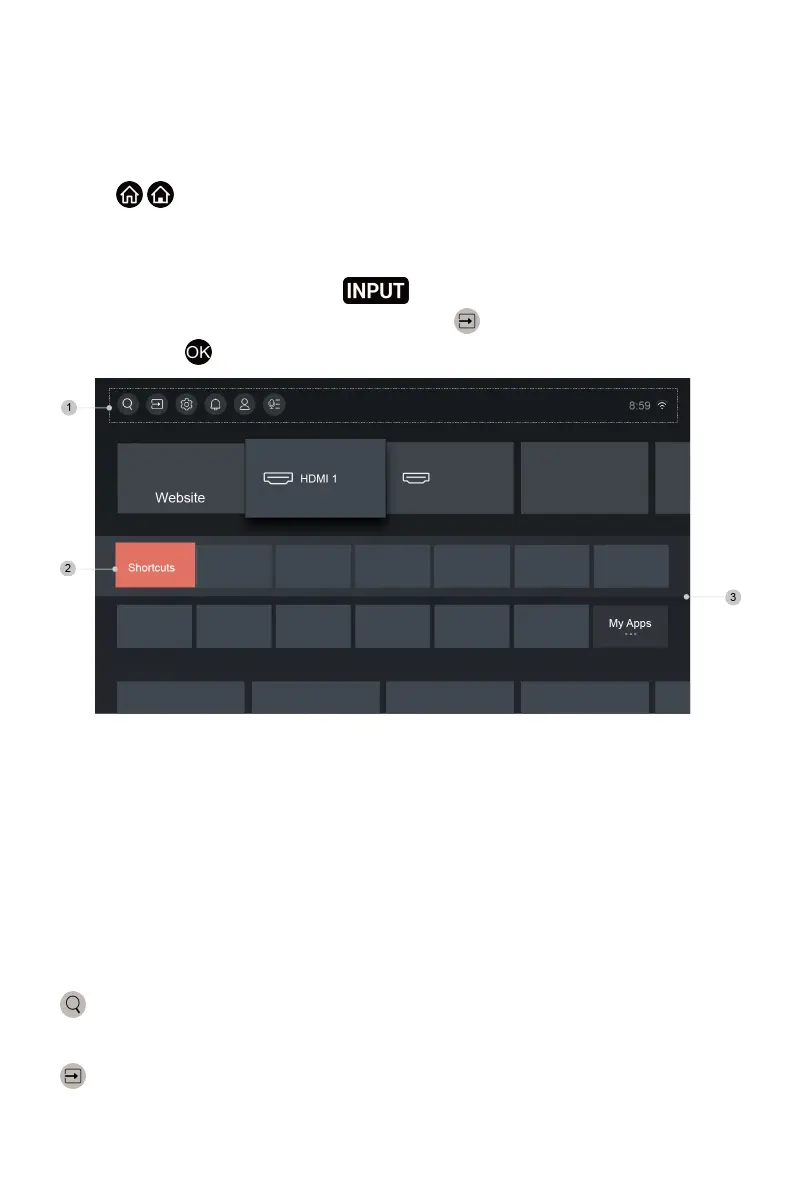
Press / button on your remote control to enter the Home screen.
The Home screen serves as the central location to run the TV more
conveniently.
To exit the Home screen, press button on your remote or use the
navigation buttons to move the cursor to the Input icon on the top of the
screen, press button to enter, and select your desired input source.
1 Navigation bar
2 Shortcuts
3 Apps
Using the navigation bar
The navigation bar refers to indicators and icons on the top of the Home
screen.
Note:
• Indicators or icons may vary depending on models/countries/regions.
Search
Search the content you want.
Input
Select the Input source depending on the device you have connected to your
TV.
31


 To Next Page