GB
10
MODE
CLOCKEQ
iR
Product Overview
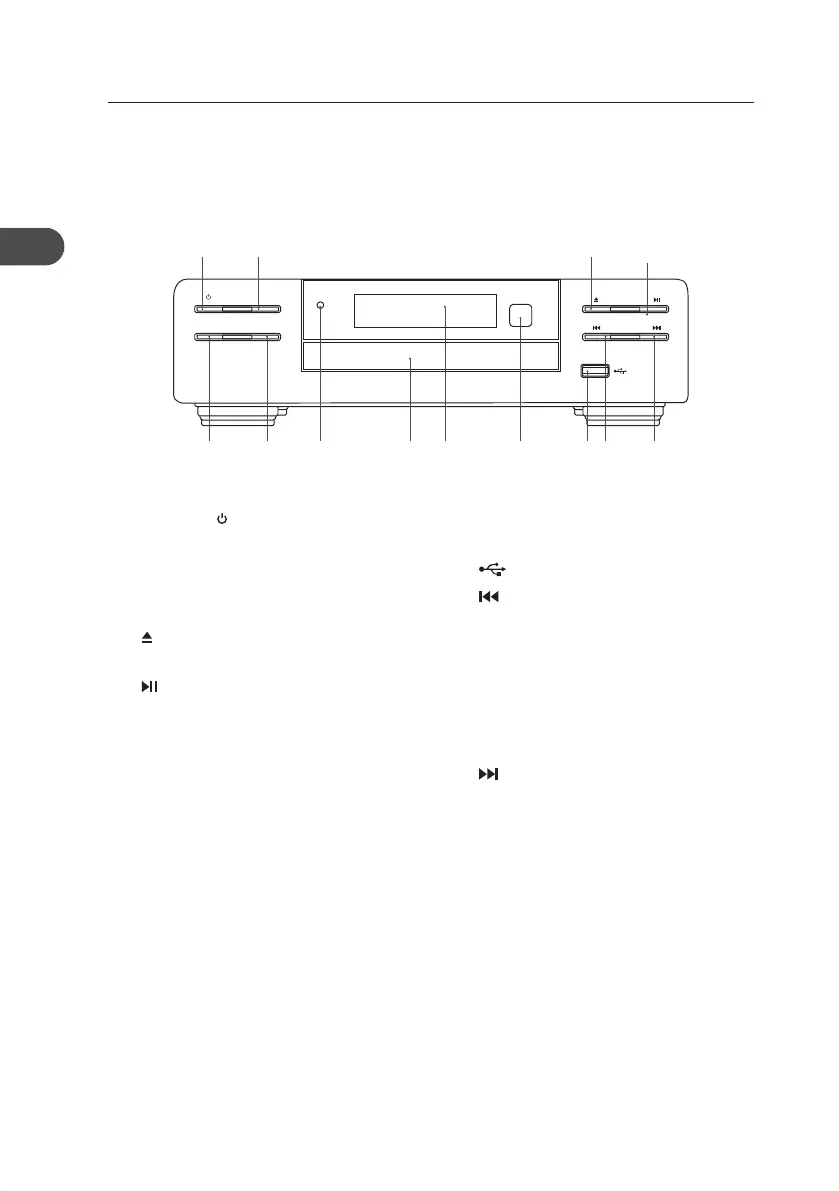
Main Unit
Front View
1. STANDBY Button
Switches the unit between the ON and
STANDBY modes.
2. MODE Button
Repeats a CD track or a music le.
3. Button
Ejects a disc from CD compartment.
4. Button
Plays/pauses/resumes playback.
5. EQ Button
Select sound eect.
6. CLOCK Button
7. Standby Indicator
• Indicator lights up red when the
unit is in STANDBY mode.
• Indicator lights o when the unit
is on.
8. Disc Compartment
9. Display
10. Remote Control Sensor
11. USB Socket
12. Button
• Skips backwards to the beginning of
the track or to the previous track.
• Allows fast reversing of the current
track.
• Searches for a radio station going
backwards through accessible radio
frequencies.
13. Button
• Skips forwards to the next track.
• Allows fast forwarding of the current
track.
• Searches for a radio station going
forwards through accessible radio
frequencies.
65 12 137 1098 11
2
4
1 3
AXM950E_IB_01GB_RC_130510_Michelle.indd 10 10/5/13 3:13 PM


 To Next Page