GB
13
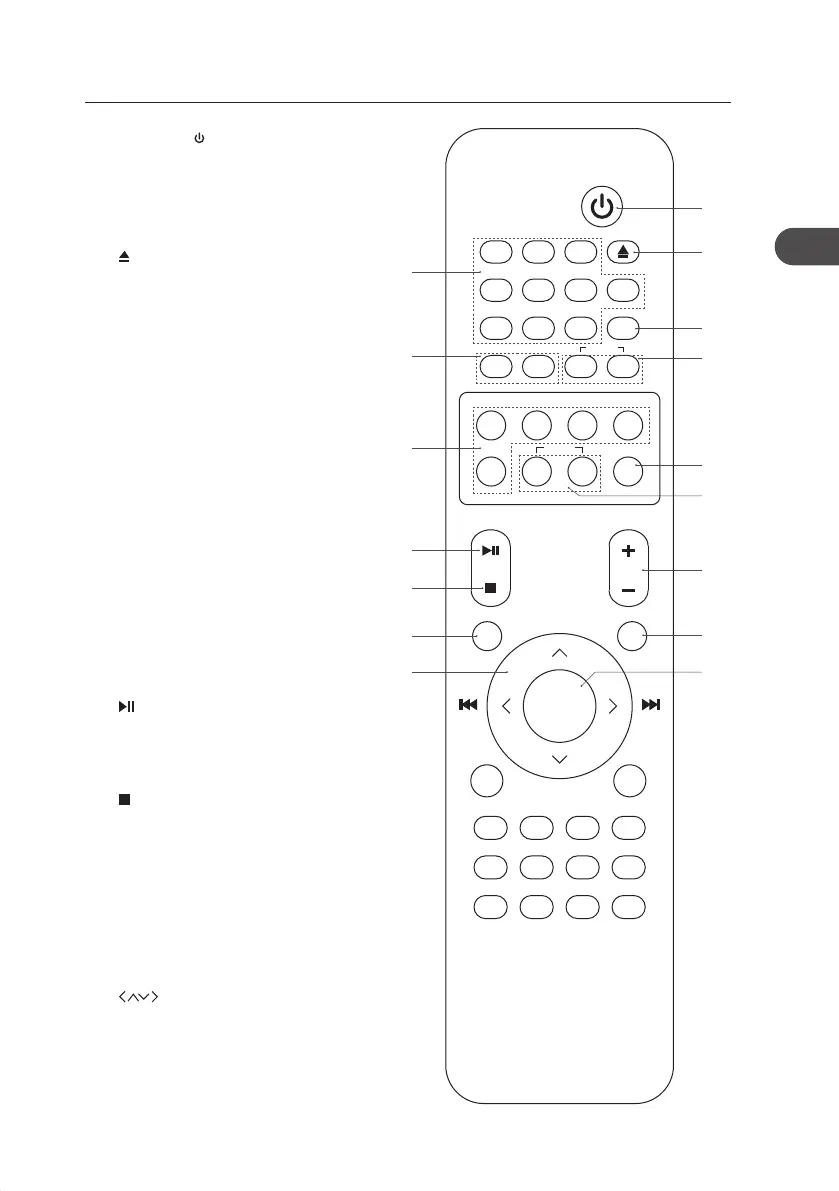
1. STANDBY Button
Switches the unit between the ON
and STANDBY modes.
2. 0-9 Buttons
Selects a soundtrack.
3. Button
Ejects a disc from CD compartment.
4. PROG Button
• Programme soundtracks.
• Presets radio stations.
5. TU + / – Buttons
Searches for a radio station going
forwards/backwards through
accessible radio frequencies.
6. PRESET + / – Buttons
Selects a preset station.
7. POP / JAZZ / ROCK / CLASSIC /
FLAT Buttons
Selects sound eect.
8. MUTE Button
Silences the unit or restores the
sound.
9. BASS + / – Buttons
Selects bass level.
10. /PAIR Button
• Plays/pauses/resumes playback.
• Access Bluetooth function to pair
with Bluetooth device.
11. Button
Stops playback.
12. VOLUME + / – Buttons
Increases or decreases the volume.
13. MENU Button
Displays menu screen.
14. REPEAT Button
Repeats a CD track or a music le.
15. Buttons
Navigates to select an item on a
menu screen.
16. ENTER Button
Conrms the selection on a menu
screen.
Remote Control
MENU REPEAT
DISPLAY SHUFFLE
VOL
DISC USB DOCK/BT FM/DAB
AUX CLOCK TIMER SLEEP
INTRO/SCAN
RDS DIM – DIM +
POP JAZZ ROCK
CLASSIC
FLAT
– +
MUTE
BASS
TU– TU+ – +
7 8 9 PROG
4 5 6 0
1 2 3
PRESET
ENTER
PAIR
2
5
7
10
11
13
15
1
3
4
6
9
8
12
14
16
AXM950E_IB_01GB_RC_130510_Michelle.indd 13 10/5/13 3:13 PM


 To Next Page