GB
28
Station Name
When an RDS station is received, the “RDS” and
the name of that station will be displayed.
PTY (Programme Type)
This describes the “Style” or “genre” of music
that is being broadcast e.g. “Rock” or “Classical”.
Frequency
This shows the frequency of the current station
e.g. 89.80MHz.
RDS CLOCK
The RDS CLOCK system may not properly
operate in areas where RDS CLOCK service is not
available. Once RDS CLOCK service is received,
the RDS CLOCK system keeps operating. “RDS
CLOCK” is displayed in areas where no RDS
CLOCK services are available.
Date
The broadcaster (Radio station) provides
date information automatically. You cannot
manually set this information on this unit. This
information is set within 2 minutes after the
frequency display changes to the station name.
In the unlikely event that the broadcaster does
not transmit any information, an incorrect date
will be displayed.
Radio Text
As with DAB, the broadcaster can include a
scrolling text that displays information about
the current program.
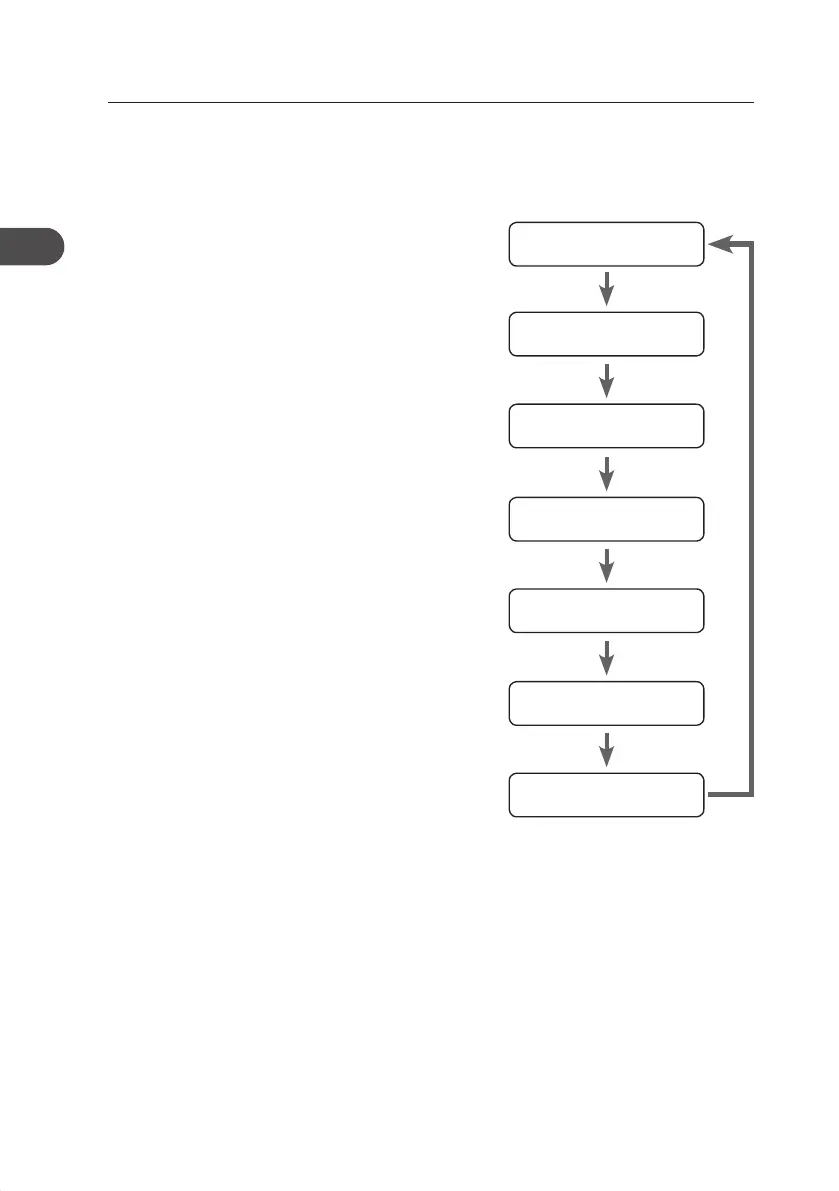
Station Name
Programme Type
Frequency
Audio Mode
Date
RDS CLOCK
Radio Text
FM Display modes
Every time you press the RDS button, the display will cycle through the following display
modes: the Station Name, PTY, Frequency, Audio Mode, RDS CLOCK, Date, TEXT.
The information is displayed on the lower segment of the display.
AXM950E_IB_01GB_RC_130510_Michelle.indd 28 10/5/13 3:13 PM


 To Next Page