GB
12
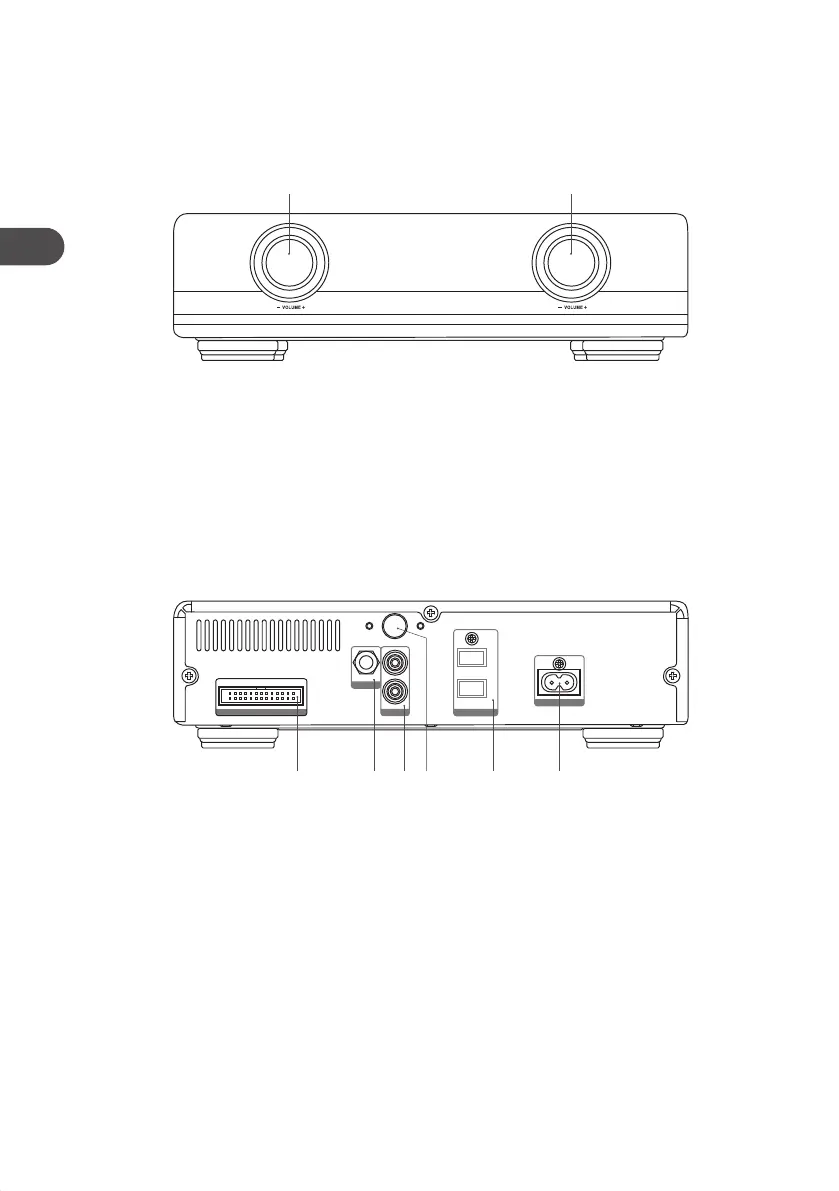
Amplier
Front View
Rear View
1. FUNCTION Dial
Switch between USB, TUNER, DAB,
DOCK, BT, AUX, and DISC mode.
2. VOLUME Dial
Adjusts the volume.
1 2
AC~
L
R
L
R
DAB
AUX
CABLE
SPEAKER OUT
1. Control Cable Connector
2. DAB Aerial Socket
Connect to a DAB Aerial.
3. AUX IN Sockets
Connect to an external audio device.
4. iPod/iPhone/iPad Socket
Connect to iPod/iPhone/iPad.
5. SPEAKER Sockets
Connect to speakers.
6. AC IN Socket
Connects the mains cable to the mains
socket.
1 2 3 4 5 6
AXM950E_IB_01GB_RC_130510_Michelle.indd 12 10/5/13 3:13 PM


 To Next Page