GB
15
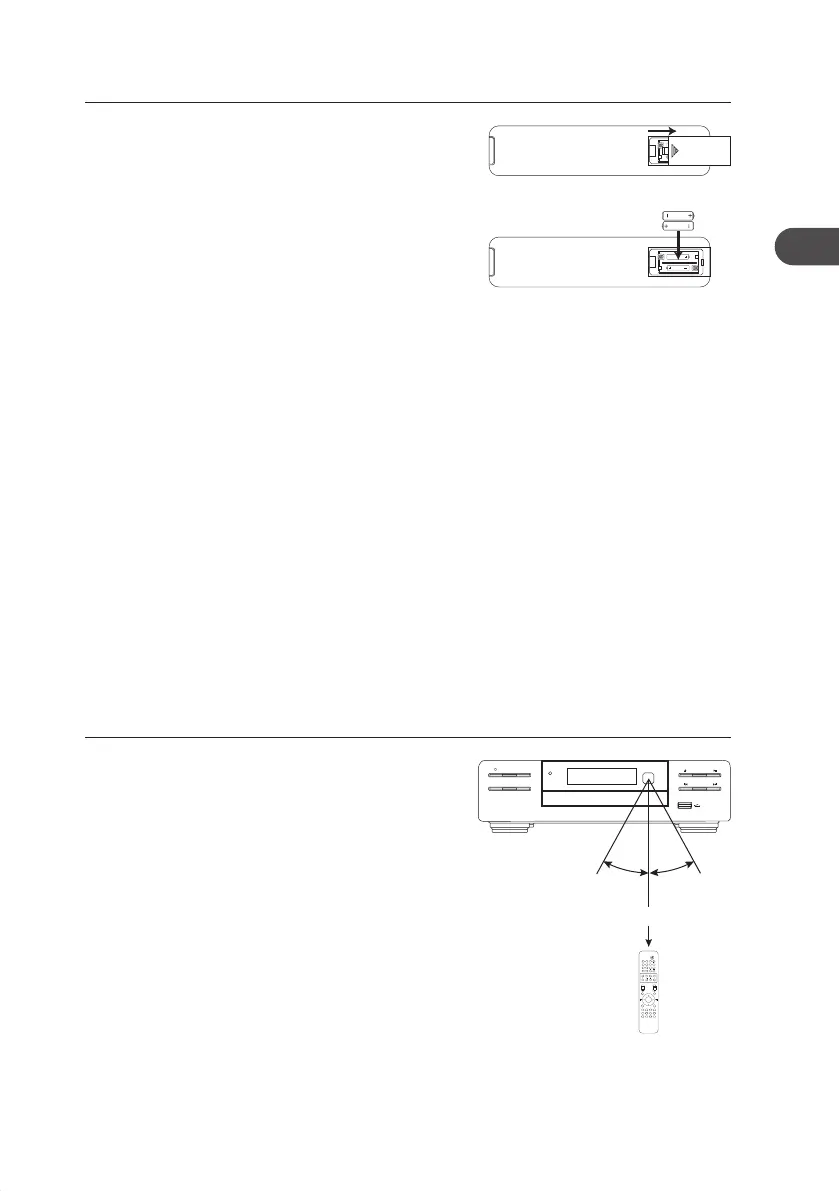
2. Insert two AAA size batteries (not included).
Make sure the (+) and (–) ends of the batteries
match the (+) and (–) ends indicated in the
battery compartment.
3. Close the battery compartment cover.
Operating Your Remote Control
1. Press and slide the back cover to open the
battery compartment of the remote control.
Remote Control Operation Range
• The remote control sensor on the front unit is
sensitive to the remote control’s commands
up to a maximum of 5 metres away and within
a maximum of a 60° arc.
• Please note that the operating distance may
vary depending on the brightness of the
room.
Handling the Remote Control
• Be aware of your ngernails when removing the battery cover and the battery.
• Do not drop the remote control.
• Do not allow anything to impact the remote control.
• Do not spill water or any liquid on the remote control.
• Do not place the remote control on a wet object.
• Do not place the remote control under direct sunlight or near sources of excessive
heat.
• Remove the battery from the remote control when not in use for a long period of time,
as corrosion or battery leakage may occur and result in physical injury, and/or property
damage, and/or re.
OPEN
MODE
CLOCKEQ
iR
MENU REPEAT
DISPLAY SHUFFLE
VOL
DISC USB
DOCK/BT
FM/DAB
AUX CLOCK TIMER SLEEP
INTRO/SCAN
RDS DIM – DIM +
POP JAZZ ROCK
CLASSIC
FLAT
– +
MUTE
BASS
TU– TU+ – +
7 8 9 PROG
4 5 6 0
1 2 3
PRESET
ENTER
PAIR
30° 30°
Max. 5 m
AXM950E_IB_01GB_RC_130510_Michelle.indd 15 10/5/13 3:13 PM


 To Next Page