AMF – Auto multiple frames
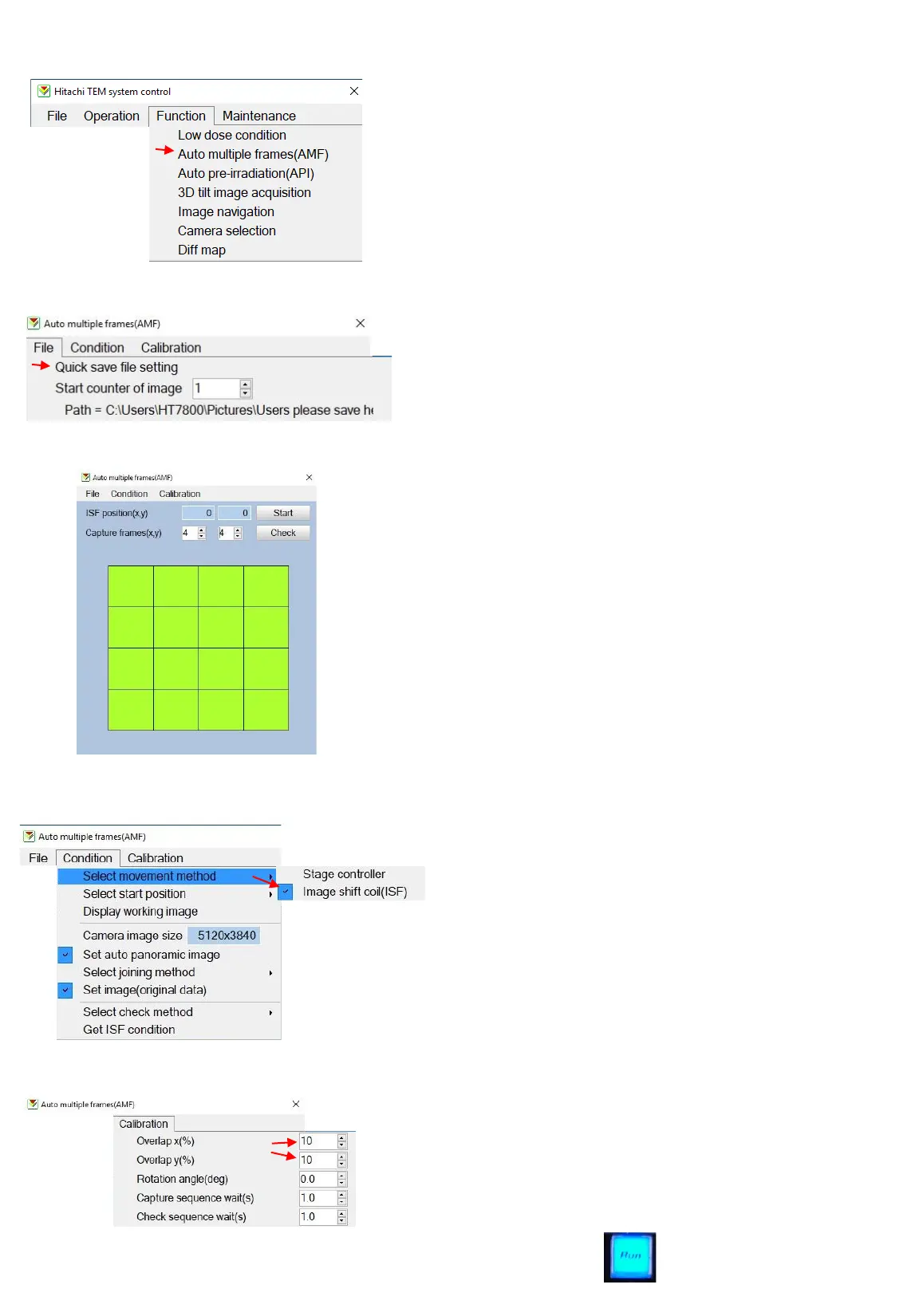
It is possible to create up to 4x4 tile scan with
the Main camera using the AMP function.
• Open the Auto multiple frames (AMF) under
Function (A).
• Define where your images should be saved
under “quick save file setting” (B).
• Define the size of your panorama image (C).
• Define the starting position (D) and make
sure you are in the desired position.
• Define the movement method (ISF is
recommended (E). Run the “Get ISF
condition” (F). You only need to do this once
per magnification range.
• Make sure the overlap is set to 10-20% (it’s
highly dependent on the image details) (G).
• Click “start” (H) and watch the acquisition.
Images will be acquired with “maximized”
capture parameters.
• Click “run” to go back to live mode in order
to protect the camera.
B
E
C
F
D
G
A
18



 To Next Page