19
Charger Operation Cont...
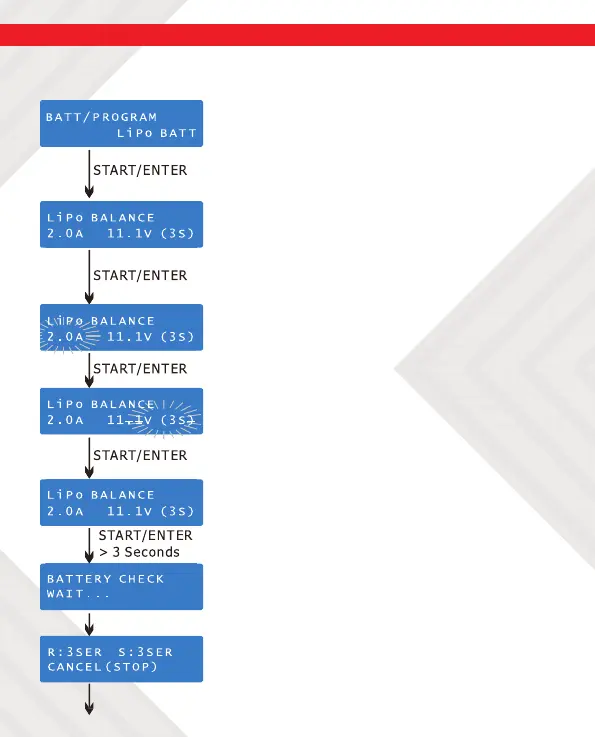
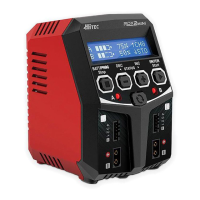
The following steps describe how to manually setup the RDX2 Mini:
3. BATT/PROGRAM Select: Press INC and
DEC to scroll through all programs and press
START/ENTER to enter the LiPo BATT Program.
4. Mode Select: Press INC and DEC to scroll
through all modes and press START/ENTER to
enter LiPo Balance Charge Mode.
5. Battery Setting: Press START/ENTER. The
current value will start to blink, Press INC and
DEC to change the value and press START/
ENTER to con rm your setting.
At the same time, the battery cell’s number
will start to blink. Press INC and DEC to
change the value and press START/ENTER to
con rm your setting.
6. Program Start: Press and hold START/
ENTER for 3 seconds to start the program.
The charger is detecting the number of
cells. R shows the number of cells detected
by the charger and S is the number of cells
set by the user at the previous screen. If the
numbers are not identical, press STOP to go
back to the previous screen and recheck the
number of cells in the battery pack before
proceeding.


 To Next Page