Need help?
Do you have a question about the HITEC RDX 2 MiNi and is the answer not in the manual?
Connects the RDX2 Mini to the wall socket (100-240V) for power.
Connects the battery's connector to the charger's XT60 output.
Connects the battery's balance wire for lithium charging in all modes.
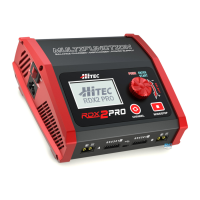
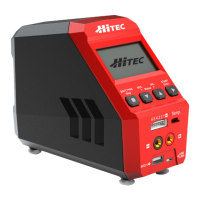
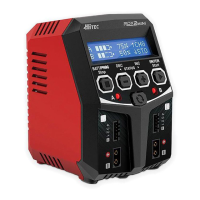
The Hitec RDX2 Mini is a high-performance, microprocessor-controlled AC dual balance charger designed for RC hobby batteries. It features advanced battery management capabilities and is compatible with a wide range of popular battery types, including Lithium-Polymer (LiPo), Lithium-Ferrite (LiFe), Lithium-Ion (Li-Ion), and high-voltage Lithium-Polymer (LiHV) batteries, as well as NiMH, NiCd, and Pb batteries. The charger is designed for ease of use, though a basic understanding of battery charging procedures is recommended for safe and successful operation.
The RDX2 Mini is primarily designed for charging and balancing RC hobby batteries. It offers dual-channel charging, allowing two batteries to be charged simultaneously, even if they have different chemistries or configurations. The charger provides various operational modes tailored to different battery types and charging needs.
For Lithium-based batteries (LiPo, LiHV, LiFe, Lilon), the RDX2 Mini offers three main charging modes:
For NiMH and NiCd batteries, the charger provides:
For Pb (Lead-Acid) batteries, the RDX2 Mini offers:
The charger also includes a Battery Resistance Meter function, which allows users to check the total internal resistance of a battery pack, as well as the internal resistance of each individual cell. This can be a useful diagnostic tool for assessing battery health.
The RDX2 Mini is designed with a user-friendly interface, featuring an LCD display and a set of intuitive buttons for navigation and control.
Input Controls:
Parameter Setting: When adjusting parameters, the value will blink, indicating it can be changed using the DEC and INC buttons. Pressing START/ENTER confirms the value and stores it. If multiple parameters are on the same screen, they will blink sequentially for adjustment.
Battery Memory (Data Store/Load): The RDX2 Mini can store up to 10 different charge profiles. This feature allows users to save program settings for specific batteries, enabling quick recall and seamless charging without needing to reconfigure parameters each time.
Terminal Voltage Control (TVC): For experienced users, the charger allows the end voltage to be reset. However, the default setting is recommended, and any changes should be made in a controlled environment with continuous battery monitoring.
Battery Icon & Percentage of Charge Display: The charger provides real-time feedback on the battery's charge status, displaying a battery icon and the percentage of charge.
Charging Status Monitor: During the charging process, the LCD screen displays real-time status information, including the battery icon, percentage of charge, charge current, battery voltage, elapsed time, and capacity. When charging two batteries simultaneously, the screen will display a summary after 10 seconds, and the channel button can be used to view the full status of either port.
Battery Check: Before starting a charge, the charger performs a battery check, detecting the number of cells in the connected battery. It compares this detected number (R) with the user-set number (S). If they don't match, the process is halted, and the user is prompted to recheck the battery pack's cell count.
The RDX2 Mini incorporates several safety and protective features to ensure safe operation and help maintain the longevity of both the charger and the batteries.
Safety Timer: This feature allows users to set a maximum time limit for charging (default 120 minutes, adjustable from 1 to 720 minutes). If the charging process exceeds this limit, it will automatically terminate. This prevents overcharging, especially if the battery is faulty or the termination circuit fails to detect a full charge.
Capacity Cut-Off Limit: Users can set a limit for the maximum mAh that can be delivered to a battery pack (default 5000mAh, adjustable from 100 to 50000mAh). If this limit is reached, the charge process automatically terminates, displaying "OVER CHARGE CAPACITY LIMIT." This protects batteries from excessive charging, particularly if the delta voltage is not detected or the safety timer expires. For a full charge, this setting should be at least 10% higher than the battery's rated capacity or turned off.
Error Messages and Audible Alerts: In the event of an error, the charger's screen will display a specific error message (e.g., "Reverse Polarity," "Connection break," "CONNECT ERROR CHECK MAIN POINT," "BALANCE WIRES NOT CONNECTED," "INT. TEMP. TOO HI," "OVER CHARGE CAPACITY LIMIT," "OVER TIME LIMIT," "CONTROL FAIL," "CELL ERROR") and emit an audible sound, alerting the user to the issue.
NiMH/NiCd Sensitivity: This setting allows users to adjust the Delta-Peak sensitivity (default 4mV/Cell, adjustable from 3-15mV/Cell) for NiMH/NiCd batteries. This helps ensure accurate full-charge detection and prevents overcharging.
Key Beep/Buzzer: The charger provides audible feedback for button presses and various mode changes, enhancing user awareness during operation.
Load Factory Set: This function allows users to reset all programmable user settings to their factory default values by pressing and holding the Start/ENTER button.
Firmware Version Display: The charger can display its hardware and firmware versions, which can be useful for troubleshooting or support.
The RDX2 Mini is designed to be a reliable and versatile charging solution for RC enthusiasts, emphasizing safety through its various monitoring and protective features.
 General
| Charge Power | 50W |
|---|---|
| Discharge Power | 5W |
| Charge Current | 0.1-6.0A |
| Discharge Current | 0.1-2.0A |
| Balance Current | 300mA / cell |
| Battery Types Supported | LiPo, LiFe, LiIon, NiMH, NiCd, Pb |
| LiPo/LiFe/LiIon Cell Count | 1-6 cells |
| NiMH/NiCd Cell Count | 1-15 cells |
| Pb Voltage | 2-20V |
| Input Voltage | DC 11-18V |


 To Next Page