−34−
5.MapSettingGroup
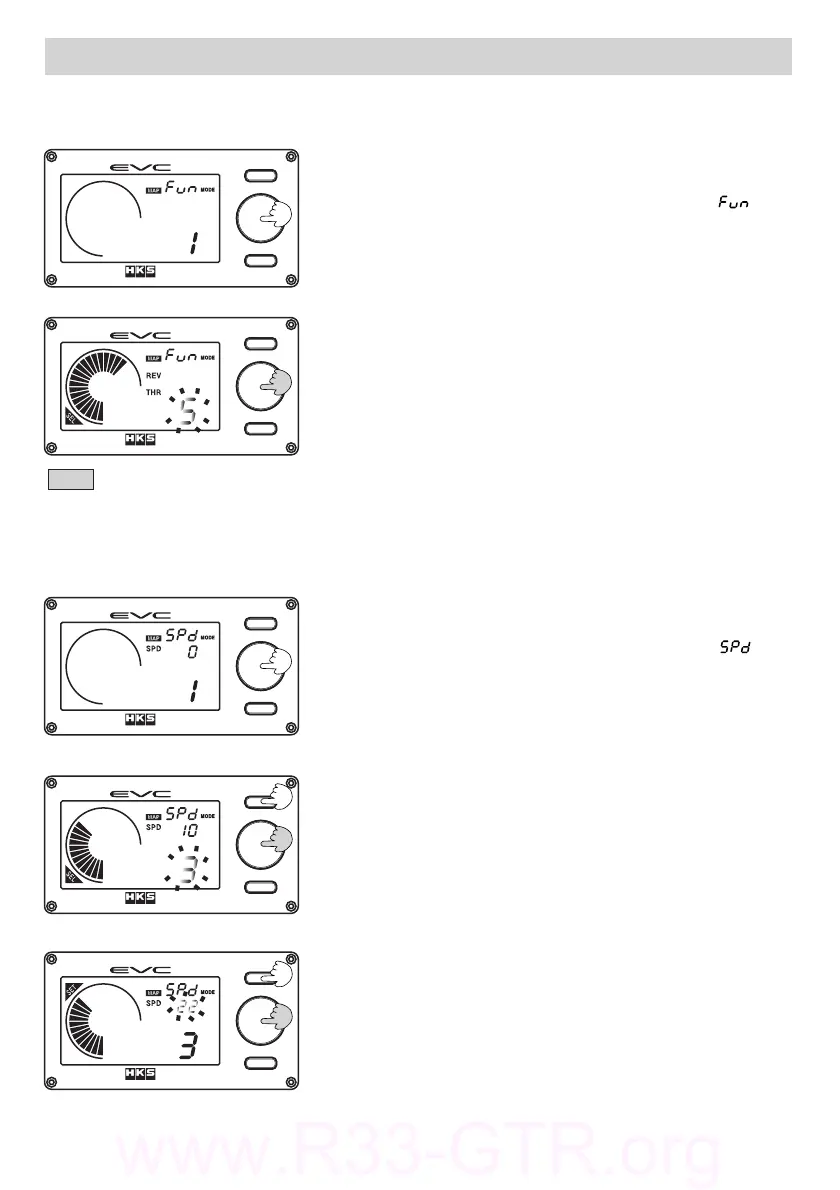
Selecttheinputsignal(s)fortheBoostCorrectionMap.
(2)Turnthevolumeknobtoselectinputsignalfunction.
Afterselectioning,pressthevolumeknob.
・1:OFF(NoMap)2:ThrottleCorrection(THR)
3:RPMCorrection(REV)4:SpeedCorrection(SPD)
5:REV+THR6:SPD+THR
・Thedefaultsettingis1
・Theillustrationontheleftshowssetting5:REV+THR
(1)PressthevolumeknobwhileintheMapFunctionSet
Mode.
・Thedigitaldisplay(S)willilluminate[].
・TheEVCwillbeepandthedigitaldisplay(L)blinks.
・"SEL"willilluminateonthedisplay.
5.1.MapFunctionsSetMode
Changethespeedaxisgridpoint(divisionpointofthemapbyspeed)forthemap.
(1)Pressthevolumeknobwhileinthespeedaxisgrid
pointsetmode.
・Thedigitaldisplay(S)willilluminate[].
・TheEVCwillbeepandthedigitaldisplay(L)blinks.
・"SEL"willilluminateonthedisplay.
・Thedisplayedspeedvalueis1/10thofactualspeed.
・Thereare5sequentialgridpoints;"1"isthelowest
and"5"isthehighest.
5.2.SpeedAxisGridPointSetMode
Note
・IntheStandardModedisplay,onlytheselectedinputsignalisshown.
(2)Turnthevolumeknobtoselectthegridpointto
change.PresstheButton①tochangethespeedvalue.
・Whenthegridpointischanged,thespeedsetting
displayisalsochanged.
・PressingButton①advancestostep(3)."SEL"
willdisappearas"SET"willappear.Thedigital
display(L)stopsblinkingandthespeeddisplay
willthenblink.
(3)Turnthevolumeknobandchangethespeedcorresponding
tothegridpoint.Whenthesettingisdone,press
thevolumeknobagain.
・Tochangeotherspeedsettings,pressButton①andgo
backtostep(2)andrepeatprocedure.


 To Next Page