−37−
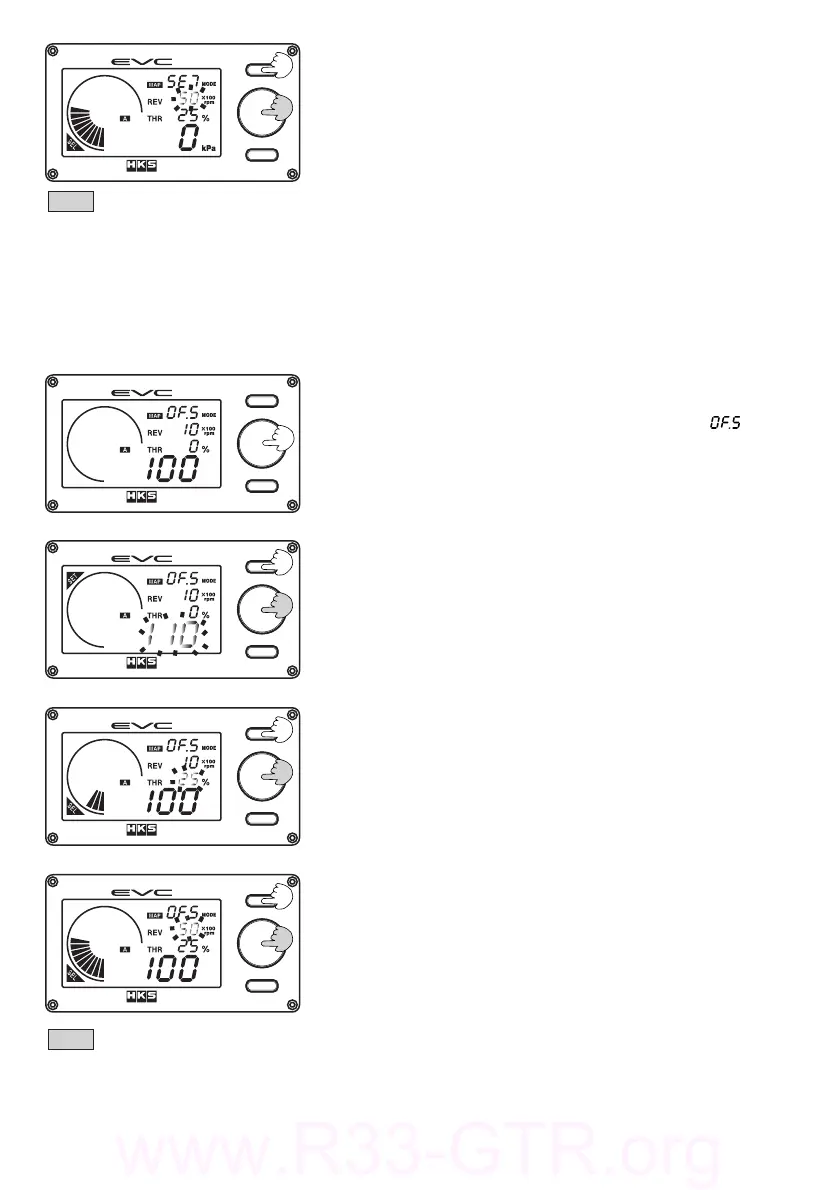
(4)TurnthevolumeknobtomovetheRPMaxis.Pressing
Button①willreturntothecorrectionboostdefault.
・PressingButton①willreverttostep(2).TheRPM
valuewillbecomeconstantandthedigitaldisplay
(L)willthenblink.
・Whenallsettingsaredone,pressthevolumeknob.
Note
・Thedefaultcorrectionboostvalueforallmapgridpointsis±0kPAor±0PSI.
・Thesettingrangemustbewithin‑120kPa〜120kPaor‑17.0PSI〜17.0PSI.
・Avoidlargevaluegapsbetweenthesequentialmapgridpointstopreventboostcontrolinstability.
Generallynotneed,butpreciseadjustmentsforthesetboostvalueofeachA/Bset
modescorrespondingtothethrottleopening%andtheengineRPMorspeedcanbedonehere.
(1)PressthevolumeknobintheoffsetmapAset
modeorBsetmode.。
・Thedigitaldisplay(S)willilluminate[].
・TheEVCwillbeepandthedigitaldisplay(L)blinks.
・"SET"willilluminate
・TheimageontheleftrepresentsthemapoffsetAmode
whenthemapfunctionmode"5"(REV=THR)isselected.
5.6.OffsetMapASetMode/OffsetMapBSetMode
(2)Turnthevolumeknobtosetthemapoffsetvalue.When
thesettingisdone,pressthevolumeknobagain.
・PressButton①tochangethemapoffsetvaluefor
otheraxes.
・PressingButton①advancestostep(3)."SET"will
appearas"SEL"disappears.Thedigitaldisplay(L)
willstopblinkingandthethrottledisplayblinks.
Turnthevolumeknobtomovethethrottleaxis.Pressing
Button①movestheRPMaxis.
(3)
・PressButton①toadvancetostep(4).Thethrottle
displaybecomesconstantandtheRPMvaluewillblink
(4)TurnthevolumeknobtomovetheRPMaxis.Pressing
Button①willreturnyoutothedefaultmapoffsetmode
・PressingButton①willreverttostep(2).TheRPM
valuewillbecomeconstantandthedigitaldisplay
(L)willthenblink.
・Whenallsettingsaredone,pressthevolumeknob
Note
・Thedefaultvalueforallmapgridpointsare100%.
・Thesettingrangemustbewithin1‑199%
・Avoidlargevaluegapsbetweenthesequentialmapgridpointstopreventboostcontrolinstability.


 To Next Page