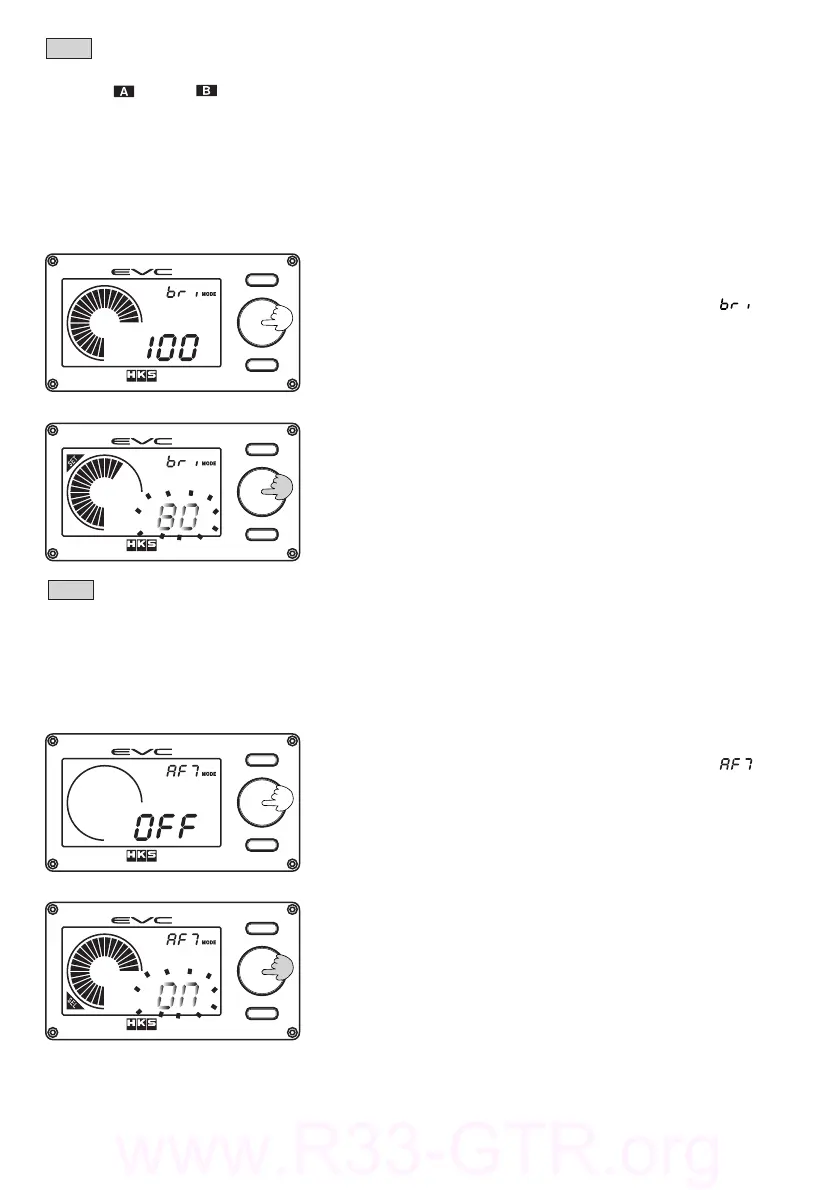
Settingthebacklight'sbrightness.
(1)Pressthevolumeknobwhileinthebacklightbrightness
setmode.
・Thedigitaldisplay(S)willilluminate[ ].
・TheEVCwillbeepandthedigitaldisplay(L)blinks.
・"SET"willilluminateonthedisplay.
6.3.BacklightBrightnessSetMode
(2)Turnthevolumeknobtosetthebacklight'sbrightness.
Afteryourselection,pressthevolumeknobagain.
・Thesettingrangeisbetween1‑100%in1%increments.
・Thedefaultsettingis100%.
・Thelowerthe%,thedimmerthetextwilldisplay.
Note
・Thisfunctionisnotlinkedtothevehicle'sheadlightilluminationordimmersystem.
−39−
Note
・Themaximumvaluesforeachselectionareasfollows:
bST/bST‑250kPaor36.0PSI、SPd‑50x10km/h、REV‑120x100rpm、
THR‑100%.
・Theminimumvalueofthebargraphfunctionsetmodeis"0"
・Thedefaultsettingisthemaximumvalueofeachrespectiveselection.
Thismodeistosetthedigitaldisplay(L)toblinkandshowthemaxboostachievedfor3
secondswhentheboostchangesfrompositivepressuretonegativepressure.
(1)Pressthevolumeknobwhileintheafterimagesetmode.
・Thedigitaldisplay(S)willilluminate[ ].
・TheEVCwillbeepandthedigitaldisplay(L)blinks.
・"SEL"willilluminateonthedisplay.
6.4.AfterImageSetMode
(2)TurnthevolumeknobtosetthefunctionONorOFF.When
theselectionhasbeenmade,pressthevolumeknob.
・ThedefaultsettingisOFF.


 To Next Page