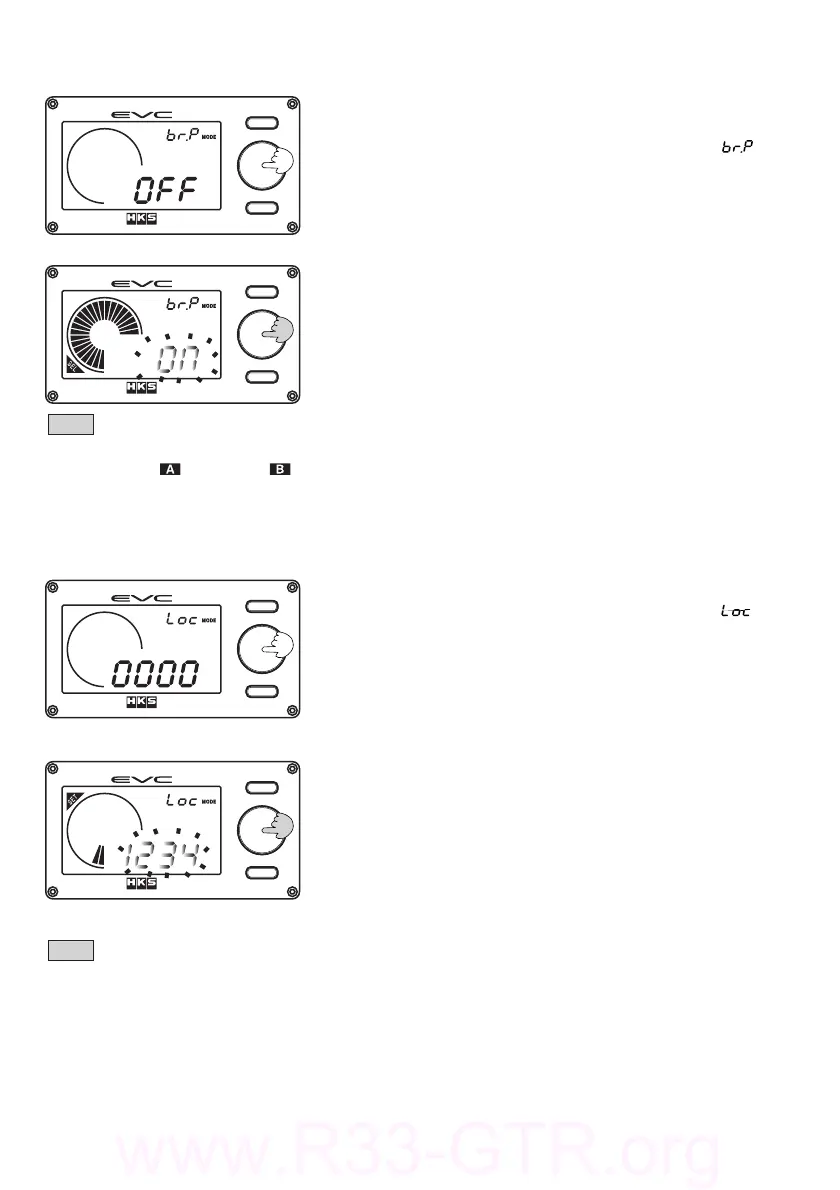
Setthebargraphtodisplaythepeakvalue.
6.5.BarGraphPeakSetMode
(1)Pressthevolumeknobwhileinthebargraphpeakset
mode.
・Thedigitaldisplay(S)willilluminate[ ].
・TheEVCwillbeepandthedigitaldisplay(L)blinks.
・"SEL"willilluminateonthedisplay.
(2)TurnthevolumeknobtosetthefunctionONorOFF.When
theselectionhasbeenmade,pressthevolumeknob.
・ThedefaultsettingisOFF.
Note
・Whenthebargraphdisplayvaluedecreses,thebarpointofthemaximumvalueremains.
・WhenbSTorbSTisselected,onlythemaximumpositivepressurebarpoint
islit.
−40−
Setthedatalockfunctionwithapersonalcodenumbertopreventanychangestothesettings.
6.6.DataLockSetMode.
(1)Pressthevolumeknobwhileinthedatalocksetmode.
・Thedigitaldisplay(S)willilluminate[ ].
・TheEVCwillbeepandthedigitaldisplay(L)blinks.
・"SEL"willilluminateonthedisplay.
・Thedigitaldisplay(L)willdisplaythefollowing:
"0000" : Nolocknumberisset.
"−−−−" : Locknumberisset.
(2)Turnthevolumeknobtosetthecodenumber.Whenthe
codeisselected,pressthevolumeknobagaintoset.
・Enterthe4digitnumberyouwouldlikeasthecode.
・Tounlock,enterinthe4digitcode.
・Thedefaultsettingis0000.
Note
・Thedatalockfunctionpertainstosetdatainthebasicsetting,themapsetting,
andthevehiclesettinggroups.
・Ifthecodenumberislostforforgotten,youwillneedtoresettheEVCaccordinly
totheproceduresin7.5AllResetMode.PleasenotethatanAllResetwillclear
allinputtedsettingsandtheEVC'sinitialsetupwillneedtoberedone.


 To Next Page