7
The control throws are a measure of how far the flight controls move. If the controls move too much, the plane will respond
too quickly and be difficult to control. Due to the great effect the control throws have on the way a model flies, the control throws
must be checked.
Set the Control Throws
These are the recommend control surface throws:
ELEVATOR: 3/8"to 7/16" [9 to 11mm] up
3/8" to 7/16" [9 to 11mm] down
RUDDER: 7/8" to 1" [22 to 25mm] right
7/8" to 1" [22 to 25mm] left
AILERONS: 3/8" to 7/16" [9 to 11mm] up
3/8" to 7/16" [9 to 11mm] down
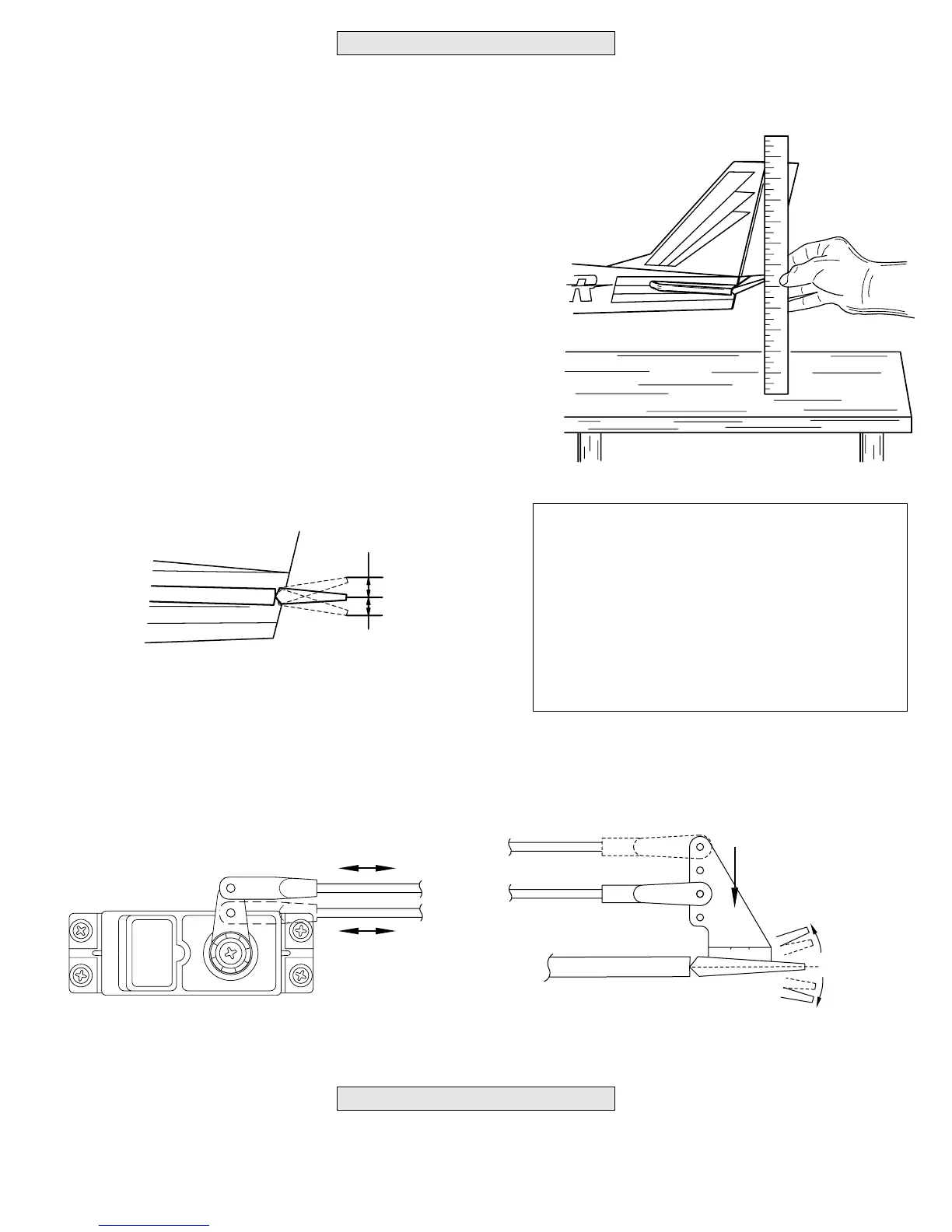
arm results in more pushrod movement.
❏ 2. Measure, and if necessary, adjust the aileron and rudder control
throws the same way.
Whether you fly at an R/C club or somewhere on your own, you should have your name, telephone number and address in or on
your model so it can be identified and returned in case it lands somewhere away from the flying site. Fill out the I.D. tag on page 11
and use spray adhesive or tape to stick it in the model.
Identify Your Model
Start with the elevator.
❏ 1. Turn on the transmitter and receiver. Holding a ruler up to the
trailing edge of the elevator, move the elevator all the way up using the
control stick on the transmitter. Measure the distance the elevator moves
up. Also move the elevator down and measure the distance. As shown in
the chart that follows, the elevator should move 3/8" to 7/16" up and 3/8"
to 7/16" down. If the elevator moves up or down more than 7/16", the
control throw must be decreased by connecting the pushrod to a hole
further in on the elevator servo arm (as shown in the drawings below). If
the elevator doesn’t move up and down enough, the control throw may be
increased by relocating the pushrods the opposite as described above.
control horn results in more throw.



 To Next Page