07
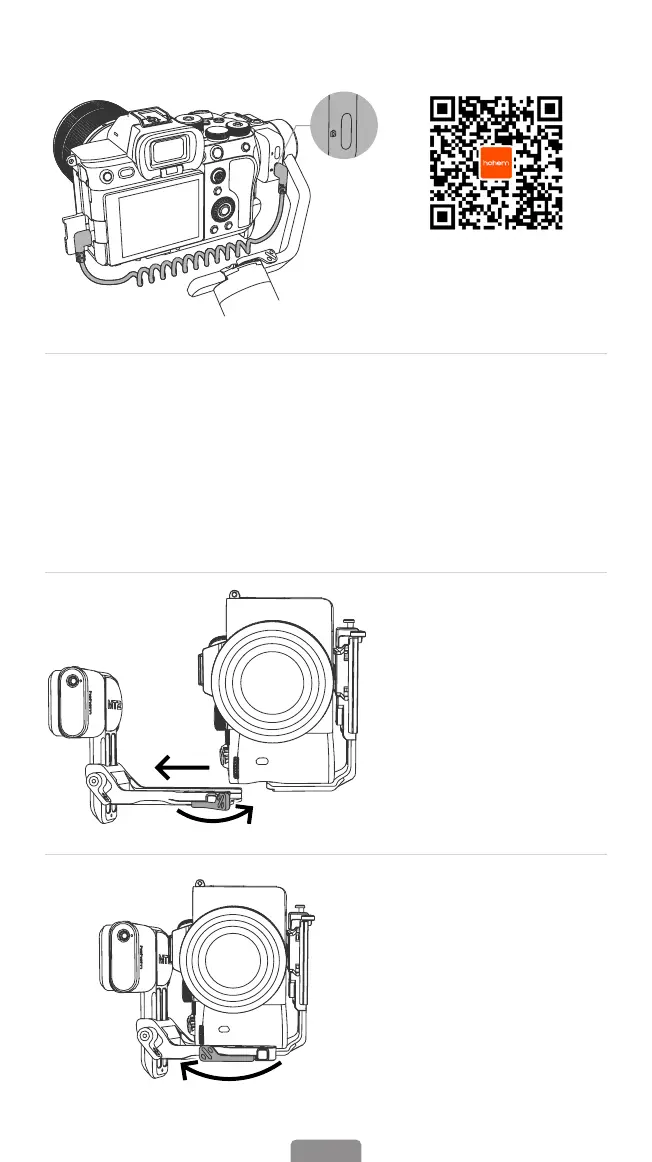
4. Connect the stabilizer to the camera with a control cable to enable control of
the shutter and other functions from the stabilizer.
Scan the QR code to
check the list of camera
compatibility and control
operations.
① Type-C to Type-C, Type-C to Micro USB, and Type-C to Mini USB are camera
charging cables. These cables can also be used for camera control.
② Type-C to Multi is the control cable exclusively for Sony cameras, it allows to
control certain Sony cameras to start/stop the lming.
③ Type C - TRRS (2.5mm), Type C - TRS (2.5mm), Type C - TRS (3.3mm) are camera
control cables.
For more supported cameras of iSteady MT2 and its tutorial, please scan the QR
code above to acquire up-to-date information.
5. Portrait Mode
a.Rotate the camera with
L-Bracket 90° to switch to
vertical shooting mode.
b.Insert the L-Bracket into
the mount slot, and lock
the mount patch.



 To Next Page