03
03 Battery and Charging
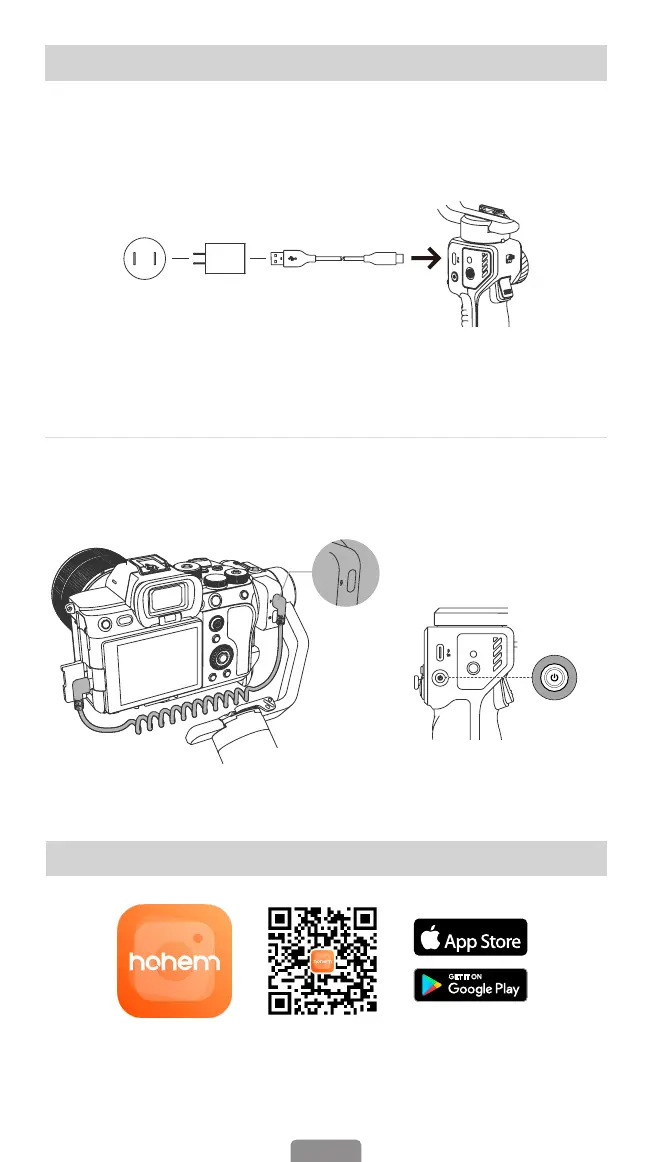
Please fully charge iSteady MT2 before using it for the rst time.
Charging Method:To charge iSteady MT2, connect a USB adapter (Not included, 5V-2A
for best) to the charging port with the provided USB-C charging cable.
USB Charger
(5V-2A)
*NOT included
in the package
Type A-Type C
Charging Cable
Charging Display: Charging is completed once the light stops ashing and the OLED
screen shows the battery icon is full.
Reverse Charging
(For Smartphone/Camera/Action Camera)
Connecting the charging cable to Type-C Reverse Charging Port of iSteady MT2.
Power
Button
04 Download the Hohem Joy App
Scan the QR code or search "Hohem Joy" in App Store or Google Play
to download.
*The Hohem Joy App requires iOS 10.0 or later, Android 6.0 or later.
Download on the



 To Next Page