10 Auto Calibration & Firmware Update
Auto Calibration
Auto calibration could reduce drift or slight deviation caused by nearby magnetic
interference or human error.
Calibration failure might happen if the gimbal is not placed on a
at surface for calibration (e.g. calibration in a running vehicle).
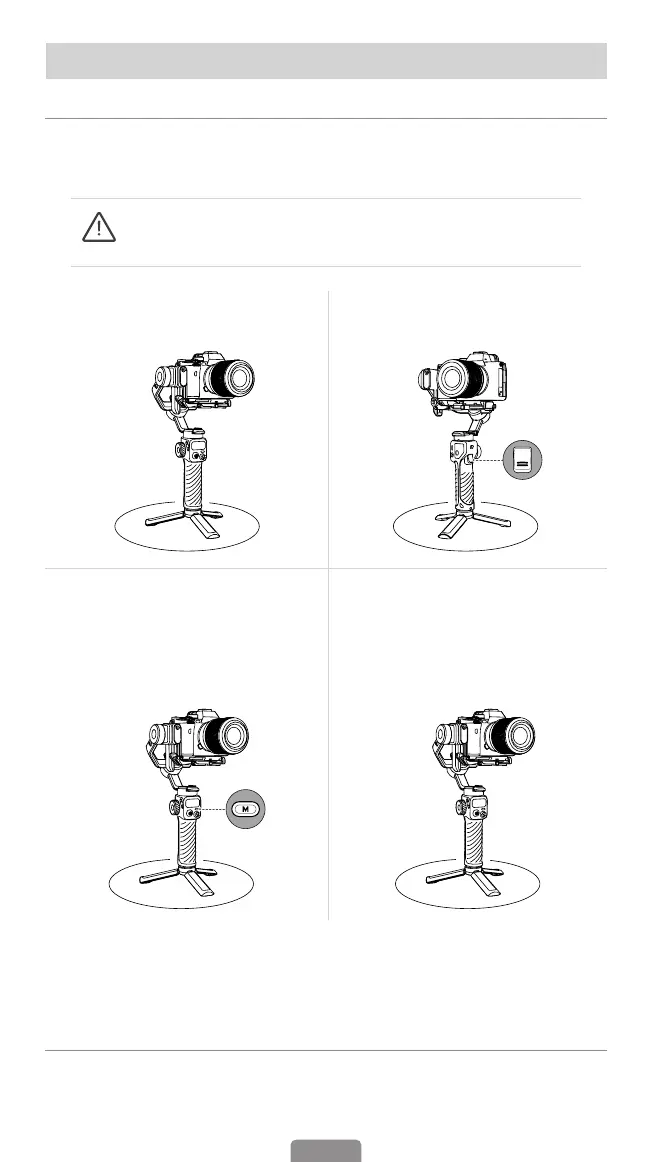
1. Place gimbal on a at surface by
means of a tripod.
2. Double press the trigger to
recenter the gimbal.
3. Press the M button ve times to
enable the auto calibration and
you will hear a beep sound. Please
do not touch the gimbal during
calibration.
4. The second beep indicates that
the calibration is completed, and
the gimbal will be recentered
automatically.
*If the calibration fails, the stabilizer will enter standby mode after two beeps. Press
any button (except the joystick) to wake up the stabilizer. Then, repeat the calibration
process following the steps mentioned above.
Firmware Update
You will be prompted in the Hohem Joy App if a new rmware update is available.
Follow the on-screen instructions in the App to update rmware.
22



 To Next Page