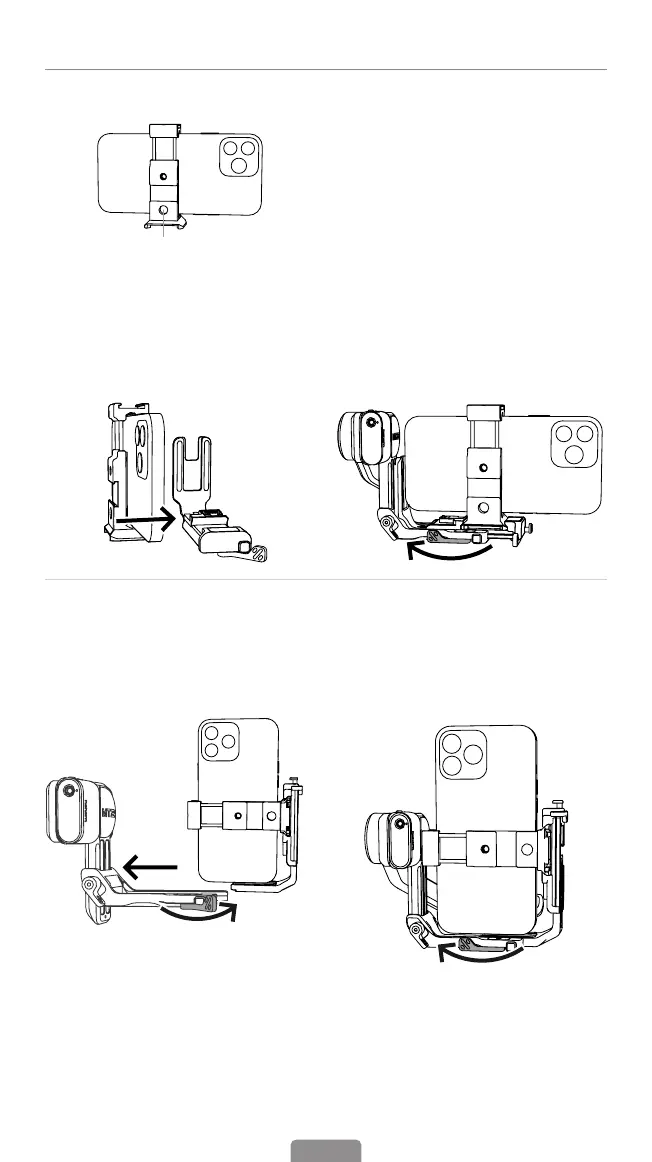
Mounting A Phone
1. Mount the Phone in Landscape Mode
*The clamp provides multiple mounting
options for various accessories.
a. Mount the phone on the phone quick
release plate in the middle.
b. Attach the phone with the quick
release plate onto the L-Bracket and
lock the quick release plate patch.
c.Insert the L-Bracket into
the mount slot, and lock
the mount patch.
2.Mount the Phone in Portrait Mode
① Rotate the phone with L-Bracket 90°
to switch to vertical shooting mode.
② Insert the L-Bracket into the mount slot,
and lock the safety lock patch.
08



 To Next Page