09
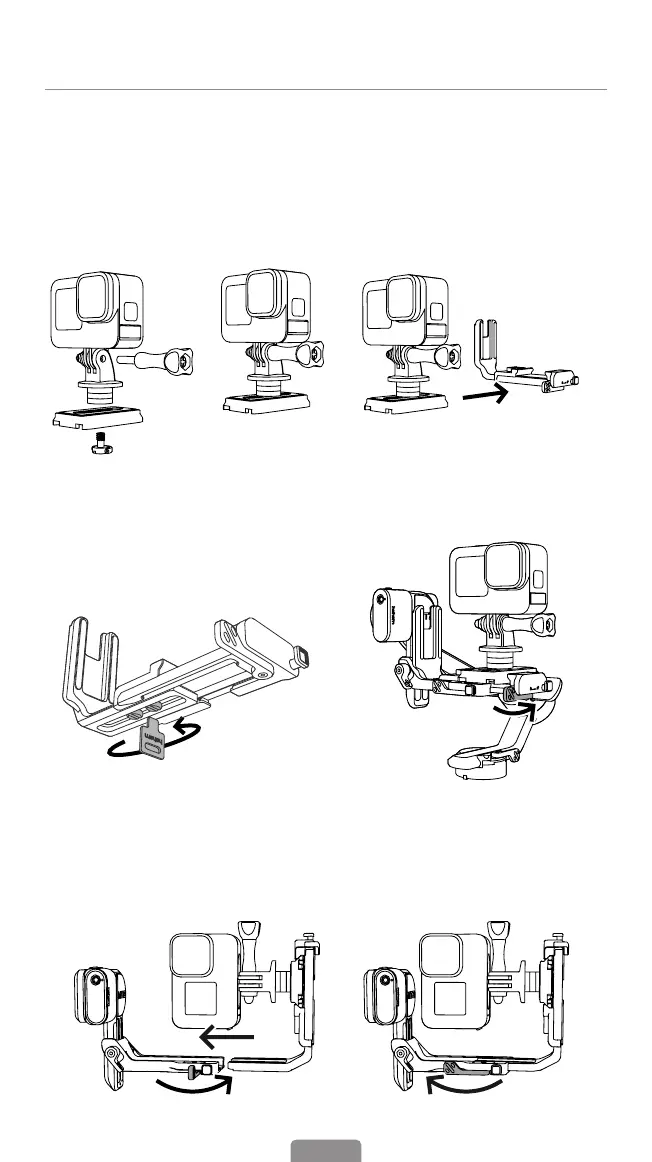
Mounting An Action Camera
1.Mount the Action Camera in Landscape Mode
① Attach the tripod adapter to the folding
ngers, then mount it onto the Arca-Swiss
quick release plate(for camera) and lock it
in place.
② Attach the action camera with the
quick release plate onto the L-Bracket
and lock the quick release plate patch.
③ Loosen the L-Bracket with the thumb
screw wrench (magnetically attached
to the L-Bracket.) Adjust the L-Bracket
according to the width of the action
camera and tighten the screw after
tting properly.
④ Insert the L-Bracket into the mount
slot, and lock the mount patch.
2.Mount the Action Camera in Portrait Mode
① Rotate the action camera with the
L-Bracket 90° to switch to vertical
shooting mode.
② Insert the L-Bracket into the mount
slot, and lock the safety lock patch.



 To Next Page