Display Setting
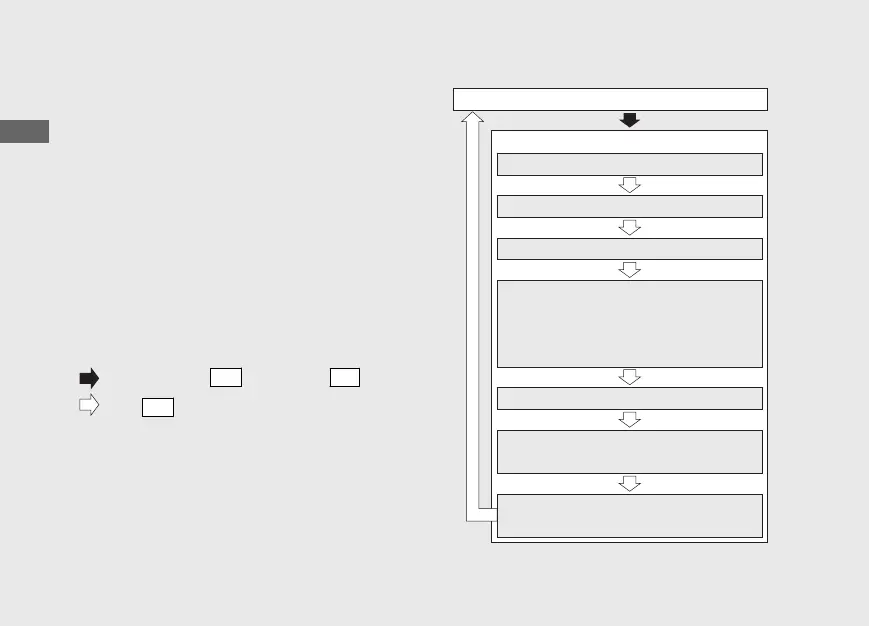
Following items to change sequentially.
• Time format setting
• Clock setting
• Backlight brightness adjustment
• Activating/deactivating of tripmeter A,
average fuel mileage and fuel
consumption automatic reset mode
• Setting of HISS indicator
• Changing of speed and mileage unit
• Changing of fuel mileage meter unit
20161220114015_32MJED100_eng_BOOK Page 29 Tuesday, December 20 2016 11:43:47 JST
Operation Guide
26
Instruments (Continued)
Press and hold
SET
button and
SEL
button
Press
SET
button
Ordinary display
Setting Mode
Time format setting
Backlight brightness adjustment
Clock setting
Setting of HISS indicator
Activating/deactivating of tripmeter A,
average fuel mileage and fuel
consumption automatic reset mode
Changing of speed and mileage unit
Changing of fuel mileage meter unit







 To Next Page