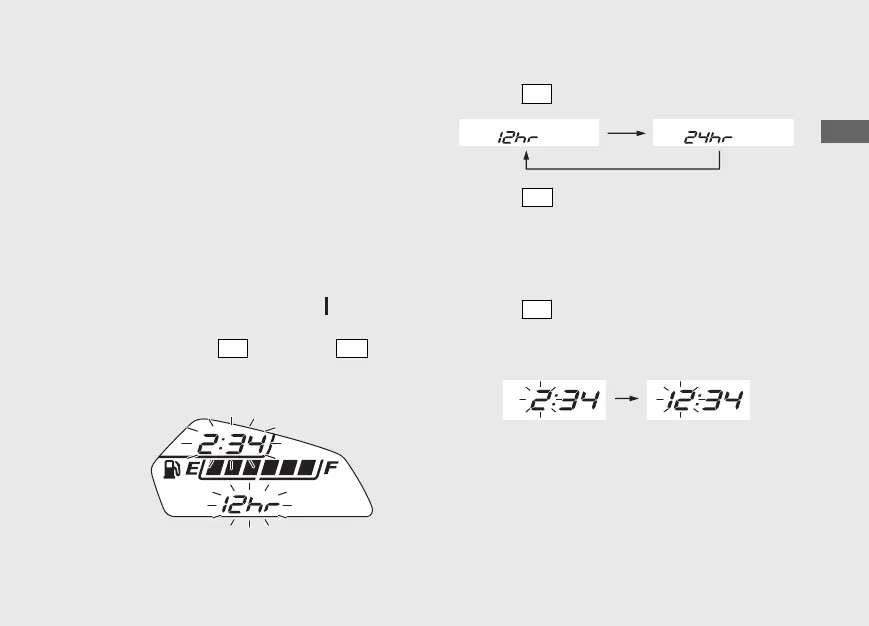
In addition, to move the ordinary display at
display setting.
• The button is not pressed for about 30
seconds.
• Turn the ignition switch off and then on.
1 Time format setting:
You can switch the time format between 12
hour format or 24 hour format.
a
Turn the ignition switch to the (On)
position.
b
Press and hold
SEL
button and
SET
button,
the current time format and the clock start
flashing.
c
Press
SEL
button to select “12hr” or “24hr”.
d
Press
SET
button. The time format is set,
and then the display moves to the clock
setting.
2 Clock setting:
a
Press
SEL
button until the desired hour is
displayed.
u Press and hold to advance the hour fast.
20161220114015_32MJED100_eng_BOOK Page 30 Tuesday, December 20 2016 11:43:47 JST
Operation Guide
27
Continued











 To Next Page