b
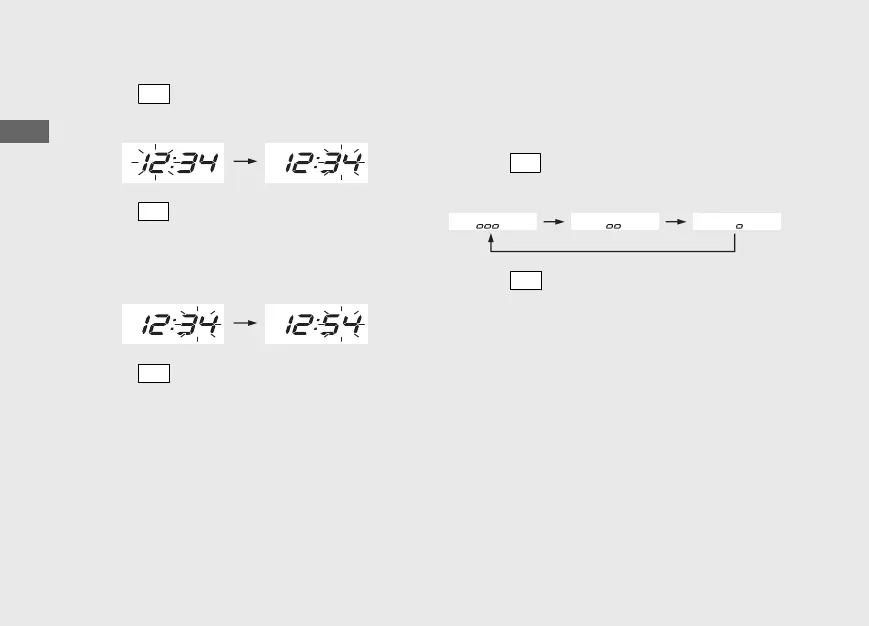
Press
SET
button. The minute digits start
flashing.
c
Press
SEL
button until the desired minute is
displayed.
u Press and hold to advance the minute
fast.
d
Press
SET
button. The clock is set, and then
the display moves to the backlight
brightness adjustment.
3 Backlight brightness adjustment:
You can adjust the brightness to one of three
levels.
a
Press
SEL
button. The brightness is
switched.
b
Press
SET
button. The backlight is set, and
then the display moves to the activating/
deactivating of tripmeter A, average fuel
mileage and fuel consumption automatic
reset mode.
20161220114015_32MJED100_eng_BOOK Page 31 Tuesday, December 20 2016 11:43:47 JST
Operation Guide
28
Instruments (Continued)








 To Next Page