EasyManua.ls Logo

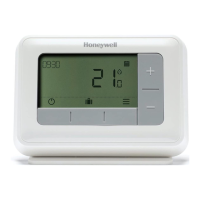
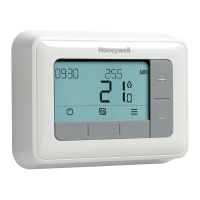
Honeywell T4 - User Manual

Honeywell T4
16 pages
Print Icon
To Next Page IconTo Next Page
Loading...
User Guide
T4, T4R & T4M Thermostat
T4
Programmable Thermostat
T4M
Programmable Modulating
Thermostat
T4R
Wireless
Programmable
Thermostat
EN

Questions and Answers

  • W
    wellsjamesAug 1, 2025
    How to fix Honeywell Thermostat if heating system doesn't respond to temperature adjustments?
    • S
      Samantha JenkinsAug 1, 2025
      If your heating system isn't responding to temperature adjustments on your Honeywell Thermostat, make sure the set temperature is higher than the current room temperature. Also, check that the heating system is powered on. If you have a T4R model, ensure the Receiver Box is powered and that the Thermostat has a wireless signal.
  • W
    wesley17Aug 6, 2025
    What to do if Honeywell Thermostat is flashing + and Receiver Box LED is off?
    • J
      Jennifer BoltonAug 7, 2025
      If your Honeywell Thermostat is flashing + and the Receiver Box LED is off, first check that the Receiver Box has power by pressing the button to switch the boiler on. If the Receiver Box has power, it indicates that no wireless binding data is stored. Follow the binding procedure in the installation guide or contact your installer for assistance.
  • M
    Miss Cathy ParrishAug 11, 2025
    How to fix Honeywell T4 Thermostat if it is flashing + and Receiver Box LED is flashing RED?
    • M
      Megan GarciaAug 12, 2025
      If your Honeywell Thermostat is flashing + and the Receiver Box LED is flashing RED, it indicates that the wireless signal has been lost. Try moving the Thermostat to another location to restore communication.
  • J
    James EllisAug 16, 2025
    What does it mean when my Honeywell T4 shows ?
    • N
      ncarterAug 16, 2025
      If your Honeywell Thermostat shows , it means the batteries have less than 10% power and need to be replaced soon.
  • A
    angel12Aug 21, 2025
    What does it mean when my Honeywell Thermostat is flashing +?
    • R
      ruizsteveAug 21, 2025
      If your Honeywell Thermostat is flashing +, it means the batteries are critically low and need to be replaced immediately. See the ‘Changing the Batteries’ section for instructions.
  • G
    Glenn ClarkeAug 27, 2025
    Why is the Receiver Box LED flashing orange on my Honeywell system?
    • M
      michael98Aug 27, 2025
      If the Receiver Box LED is flashing ORANGE, the Receiver Box is in binding mode. It will automatically time out of this mode after 3 minutes.

Summary

Thermostat Interface Overview

Status Icons Explained

Explains the meaning of various icons displayed on the thermostat screen.

Menu Navigation and Icons

Menu & Navigation Icons

Details the icons used within the thermostat's menu system.

Navigating the Menu

Provides step-by-step instructions on how to use the thermostat's menu.

Heating Schedule Configuration

Setting the Heating Schedule

Guides users on how to set up the default heating schedule periods and temperatures.

Adjusting Schedule Periods

Explains how to modify start times, end times, and temperatures for schedule periods.

Thermostat Settings

Clock and Date Settings

Instructions for adjusting the thermostat's time, date, and clock format.

Keypad Lock Functionality

Details on how to lock and unlock the thermostat's keypad to prevent accidental changes.

Optimisation Features

Optimum Start and Delayed Start

Explains how to use Optimum Start and Delayed Start for energy efficiency.

Optimum Stop Functionality

Details on using Optimum Stop to save energy by switching off heating earlier.

Operating Modes and Alerts

OpenTherm Boiler Alerts (T4 M only)

Information on viewing alerts received from an OpenTherm boiler on the T4M.

Standby Mode with Frost Protect

How to use Standby mode to save energy and prevent pipe freezing.

Away Mode Operation

Instructions for setting the thermostat to Away mode for energy saving when absent.

Schedule Override Options

Temporary Override

Setting a temporary temperature override until the next scheduled change.

Timed Override (1 or 2 hours)

Using timed overrides for short-term heating boosts or economy settings.

Turn Schedule Off (Manual Mode)

How to permanently disable the heating schedule and set a fixed temperature.

Battery Replacement (T4 & T4 R)

Replacing Thermostat Batteries

Step-by-step guide on how to change the batteries in the T4 and T4R thermostats.

Wireless Receiver Box (T4 R)

Receiver Box Communication Status

Understanding the LED indicators and signal status for the T4R receiver box.

Manual Boiler Override

How to manually control the boiler using the receiver box button.

Troubleshooting Common Issues

Screen Issues and Battery Problems

Solutions for a blank screen or low battery warnings on the thermostat.

Heating System Response Problems

Troubleshooting when the heating system does not respond to thermostat adjustments.

Sensor Faults and Signal Issues

Guidance for issues related to faulty thermostat sensors or wireless signal.

Specific Model Troubleshooting

T4 R Wireless Signal Loss

Diagnosing and resolving wireless signal loss issues between T4R and receiver.

T4 M OpenTherm Boiler Alerts

Interpreting error codes and descriptions for OpenTherm boilers on the T4M.

Honeywell T4 Specifications

General IconGeneral
Temperature Range40°F to 90°F (4.5°C to 32°C)
Fan ModesAuto, On
Wi-Fi CapableNo
TouchscreenNo
Energy Star CertifiedNo
DisplayDigital
Programming7-day programmable
Power SourceBattery or Hardwired
Stages1 Heat/1 Cool
Operating ModesHeat, Cool, Off

Videos

How to Setup the Honeywell T4 Thermostat

How to Use Your Honeywell T4 Pro Thermostat

How to Lock and Unlock a Honeywell Home T4 Series Thermostat

How to Reset Honeywell T4 and T4R Thermostat: Quick Guide

Related product manuals