Using the Document Camera
The Pilot includes one of the most powerful document cameras, the HoverCam Solo 8Plus. The
document camera is useful for showing live imaging, recording lessons, scanning documents, video
chatting, live digital annotations, and much more. The document camera can be used with nearly any
USB camera software, but it is recommended to use the HoverCam Flex 11 software (included).
Specifications Include:
•
13 MP Camera Sensor
•
4K Resolution
•
HD Video @ 120fps
The Solo 8Plus document camera features several convenient features, such as orientation, zoom
and focus controls, as well as integrated LED lighting.
•
480x Zoom
•
Auto Focus Lens
•
Built-in microphone with noise reduction
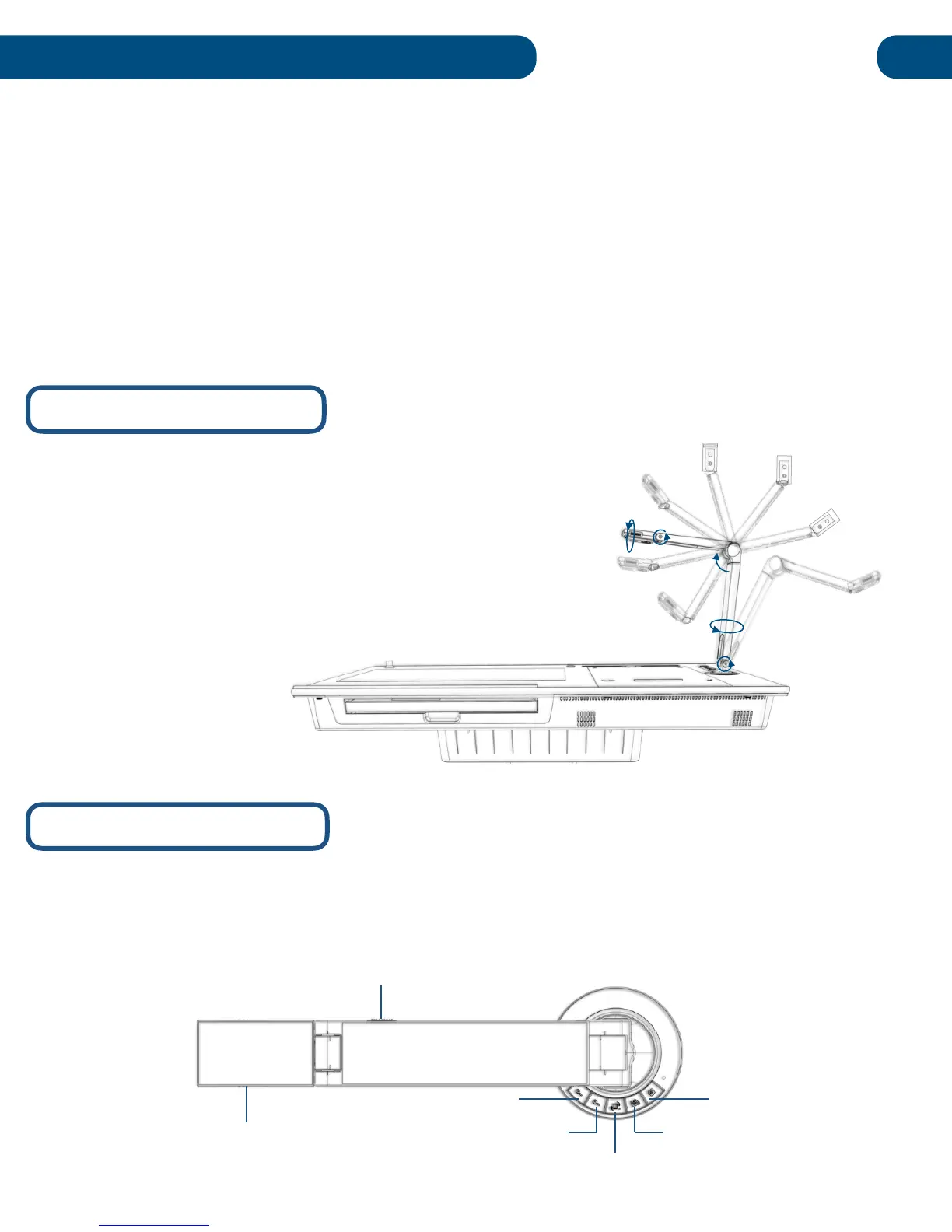
The Solo 8Plus document camera allows for a wide range
of viewing angles. The camera base can pivot 270º, giving
users the option to switch between using the optional
document positioning mat and the included side tray. Each
of the camera’s arms can fold 180º for extended reach and
convenient stowage when not in use. The camera head
can also fold 180º and roll 270º to use as webcam or
classroom camera.


 To Next Page