Interfacing with other Devices
The Pilot can easily act as an output display and annotation tool for external devices such as
laptops, tablets, phones and other devices with HDMI-output or internet access. There are two
primary interfacing methods that are preloaded on the Pilot:
1. Wired through the HDMI Viewer program. This is a solution for iOS devices (with Lighting ports)
or devices that have an HDMI output.
2. Wireless through the Reflector 2 program. This is a solution for mobile devices or web-enabled
devices without an HDMI-out.
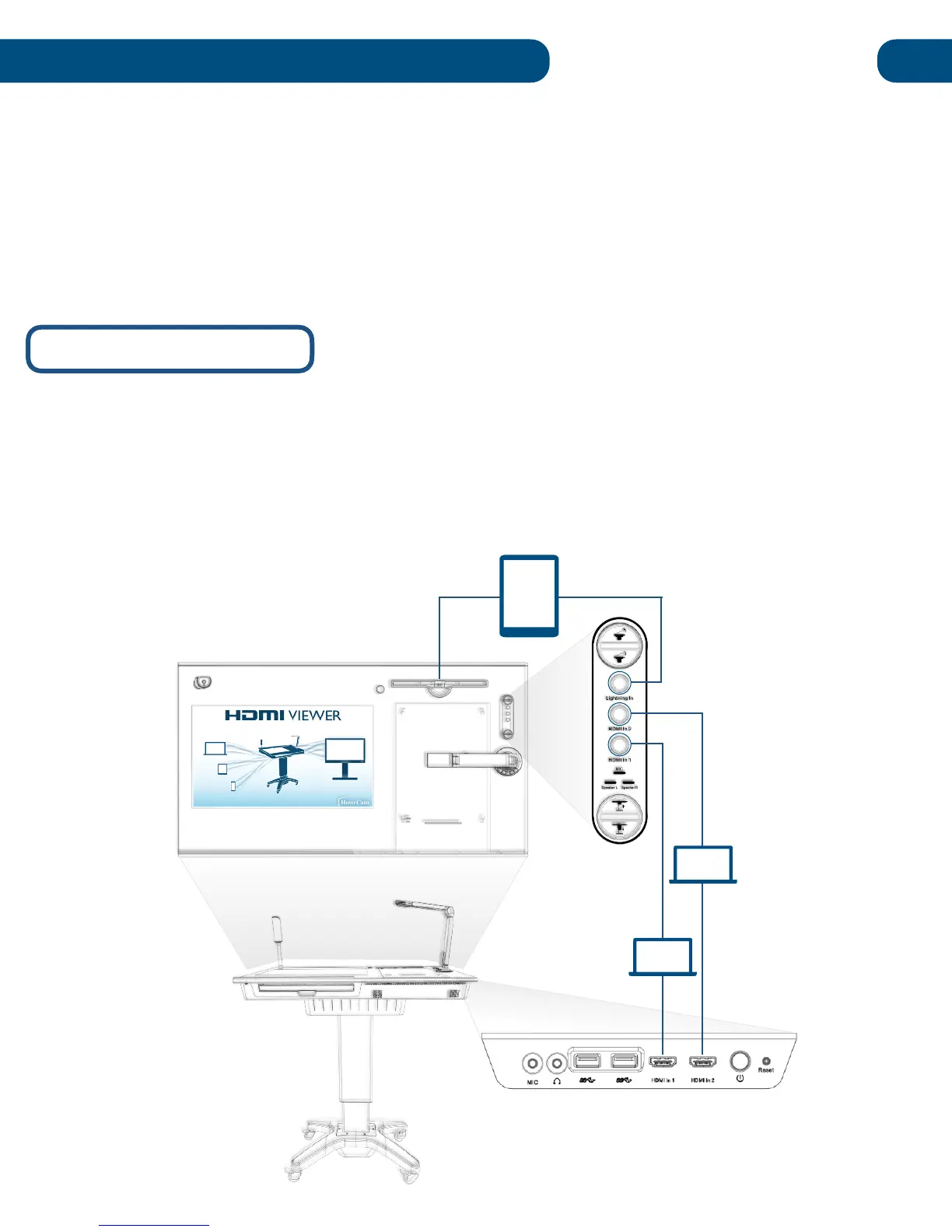
First, connect your device to the Pilot via an HDMI cable into one of the two HDMI-In ports on the right
side of the podium. If you're using an iOS device with a lighting connector, insert it into the iOS dock in
the upper-righthand corner of the podium surface.
Once your device is connected, select the corresponding input using the podium control panel that’s
next to the iOS dock. If you have multiple devices connected across the three inputs, you can easily
switch between them using the podium controls.


 To Next Page