9
EN
5.4
Setting Up the Load Power Curve and Output Power
Setting the Load Power Curv
e
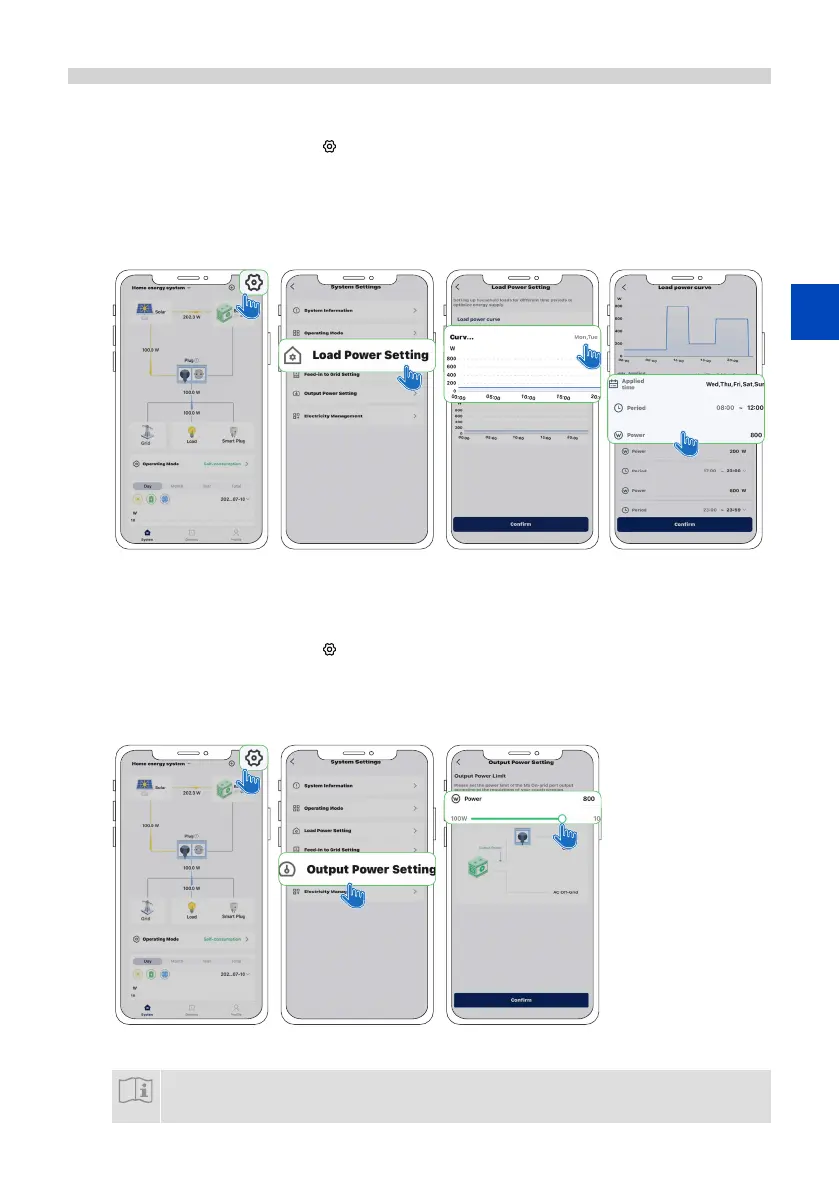
A) Tap System > System Setting .
B) Tap Load Power Setting.
C) Choose the day for which you want to set up the load power curve.
D) Divide the day into dierent periods and enter the load power value for each period.
E) Tap Conrm to save your setting.
A). B). C). D).
Setting Up the Output Power
A) Tap System > System Setting .
B) Tap Output Power Setting.
C) Drag the slider to the right to set the desired output power.
D) Tap Conrm to save your setting.
A). B). C).
NOTICE
Load power curve setting provides more detailed control over power delivery throughout the day. You
can congure up to seven load power curves but only one curve can be applied per day. We recommend
conguring load power curves to maximize the use of solar energy generated by PV modules.




 To Next Page