8
EN
5.3
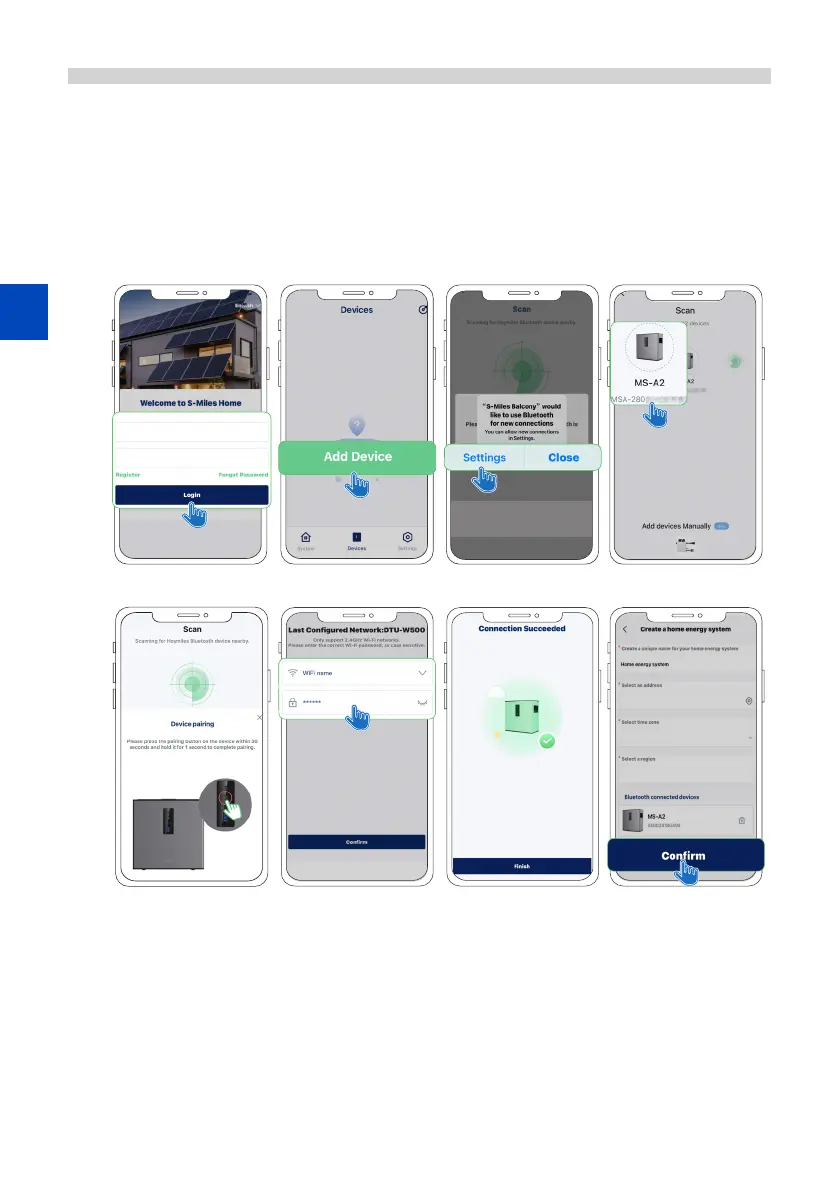
Connecting the MS-A2 to Wi-Fi
A) Launch and log in to the app using your credentials.
B) Go to Devices > Add Devices. A pop-up dialog will prompt you to enable your phone's Bluetooth.
C) Follow the prompts to pair your phone to the MS-A2.
D) Select your home Wi-Fi network and enter your network password. Then tap Conrm to connect the
MS-A2 to Wi-Fi.
E) Once connected to your home Wi-Fi, you will be directed to create your home energy system. Enter
all information then tap Conrm.
A). B)-1. B)-2. C)-1.
C)-2. D)-1. D)-2. E).




 To Next Page