EasyManua.ls Logo

HP 48G - Page 17

HP 48G
84 pages
Print Icon
To Next Page IconTo Next Page
To Previous Page IconTo Previous Page
Loading...
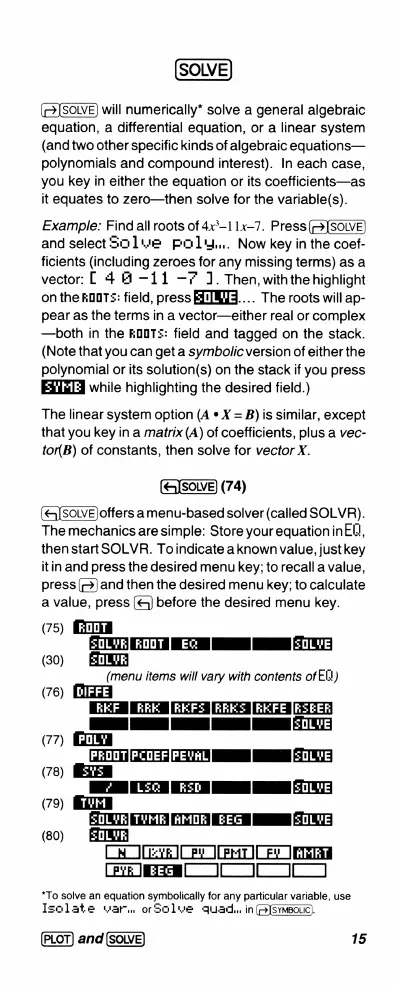
SOLVE
will
numerically*
solve
a
general
algebraic
equation,
a
differential
equation,
or
a
linear
system
(and
two
other
specific
kinds
of
algebraic
equations—
polynomials
and
compound
interest).
In
each
case,
you
key
in
either
the
equation
or
its
coefficients—as
it
equates
to
zero—then
solve
for
the
variable(s).
Example:
Find
all
roots
of
4x*~11x-7.
Press(—>]SOLVE
and
select
S0
1we
pold..
Now
key
in
the
coef-
ficients
(including
zeroes
for
any
missing
terms)
as
a
vector:
[
4
B =11
=7
1.
Then,
with
the
highlight
on
the
kOOTs:
field,
press
EINMS....
The
roots
will
ap-
pear
as
the
terms
in
a
vector—either
real
or
complex
—both
in
the
kOOT::
field
and
tagged
on
the
stack.
(Note
that
you
can
get
a
symbolic
version
of
either
the
polynomial
or
its
solution(s)
on
the
stack
if
you
press
while
highlighting
the
desired
field.)
The
linear
system
option
(A
*
X
=
B)
is
similar,
except
that
you
key
in
a
matrix
(A)
of
coefficients,
plus
a
vec-
tor(B)
of
constants,
then
solve
for
vector
X.
(74)
(e[sowvE)offers
amenu-based
solver
(called
SOLVR).
The
mechanics
are
simple:
Store
your
equationinEll,
then
start
SOLVR.
Toindicate
aknownvalue,
justkey
itin
and
press
the
desired
menu
key;
to
recall
a
value,
press
(@)
and
then
the
desired
menu
key;
to
calculate
a
value,
press
(&
before
the
desired
menu
key.
(75)
B
TR
T
EEE
.
T
(30)
BN
(menu
items
will
vary
with
contents
of
E))
(76)
[KKF
KRK
|RKF3|RRES
|RKFE
[RZEER]
T
1
1
IsoLvE
(77)
PrOOTIPCOEF[PEVAL]
|
[sOLVE
(78)
I
TN
I
I.T
(79)
TT
T
T
I
T
(80)
HINI
CeO=vR]
R
1
(PHTI
CFe
1R
CEvE
I
]
*To
solve
an
equation
symbolically
for
any
particular
variable,
use
Isolate
war.
orSolwe
gquad.
in
(B)sYMBoLC).
and
15

Related product manuals