EasyManua.ls Logo

HP 48G - Page 16

HP 48G
84 pages
Print Icon
To Next Page IconTo Next Page
To Previous Page IconTo Previous Page
Loading...
Use
a
Ciomiiic
plot
type
for
circles,
hyperboli,
para-
boli,
orellipses.
Exmpl.:
'
4¥R*E-3#{+Y*Z-4=R"
View
from—&.
Stof.
T
(H:)and—3.
2
to
3.
1
().
Use
a
Pl
ar
plot
type
for
functions
dependent
on
a
central
angle.
Example:
'RE=3#5IN(Z.5*8)'
To
plotthis,
change
the
independent
variable
tod
and
set
its
starting
and
ending
values
to
&
and
1
2.
&
(=
4n).
Use
aFar-amet
11
plot
for
function
pairs
related
by
an
independent
parameter.
You
enter
the
func-
tions
in
the
complex
form
x(¢)
+iy(t).
Example:
To
plot
"HOTI=T#COSCT2"
and
"Y(TI=TSINCT)'
you
en-
ter
'
T#COSCTI+i#T#5IMCT)'.
ThenT
is
your
inde-
pendent
variable;
set
H-VIEM:
at
E
to
.
23,
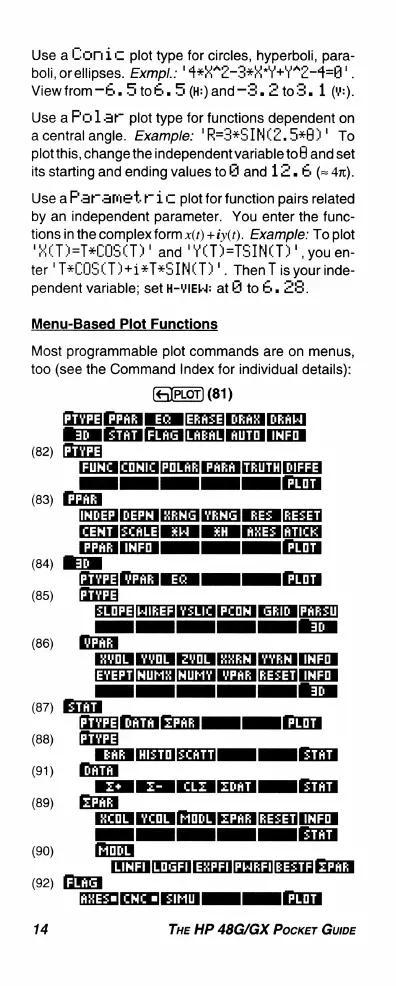
Menu-Based
Plot
Functions
Most
programmable
plot
commands
are
on
menus,
too
(see
the
Command
Index
for
individual
details):
(81)
PTVPE|
PPAR
EC
ERASE]
DRAR
[DRAL)
30
=TAT
[FLAG
[LAEAL]
AUTOINFO
(82)
[FUMC
|CONIC
[POLAR]
PAkA
|TRUTH]
DIFFE
flm_—---_
INDEP
DEPM
HENG[YENG]
RES
JRESET
[CEMT
[CALE]
%14
¥H
AHES
JATICK]
[PPAELINFOL
|
|
|PLOT
PTYPE[vPAR
E&:
[
[PLOT|
(85)
SLOPE|HIKEF]
Y5LIC
PCOMSRID
[PARSL
T
TT
T3]
(86)
BT
TT
T
R
AT
[EYEPT|MUMY
[WUHY
YPAF
[REZET]
IMFO
ID
N
e
T
(87)
[PTYPE|
pATA
[ZPAR]
|
[PLOT]
(88)
EAk
[HISTO[SCATT]
[
[SThT|
(91)
E+E-
[CLE
[ZoaT[
[:SThT|
(83)
(84)
(89)
bl
O
e
[
(]
F:E'.EET
T
T
1T
1
1s7aT]
(90)
G
LINFI
[LOGFI|
EXPFI|PHEFI|EEZTF|
ZPAF
(92)
AT
TV
I
I
0T
14
THe
HP
48G/GX
Pocker
GuIDE

Related product manuals