EasyManua.ls Logo

HP HP-28S - BDISP (Binary Display)

HP HP-28S
341 pages
Print Icon
To Next Page IconTo Next Page
To Previous Page IconTo Previous Page
Loading...
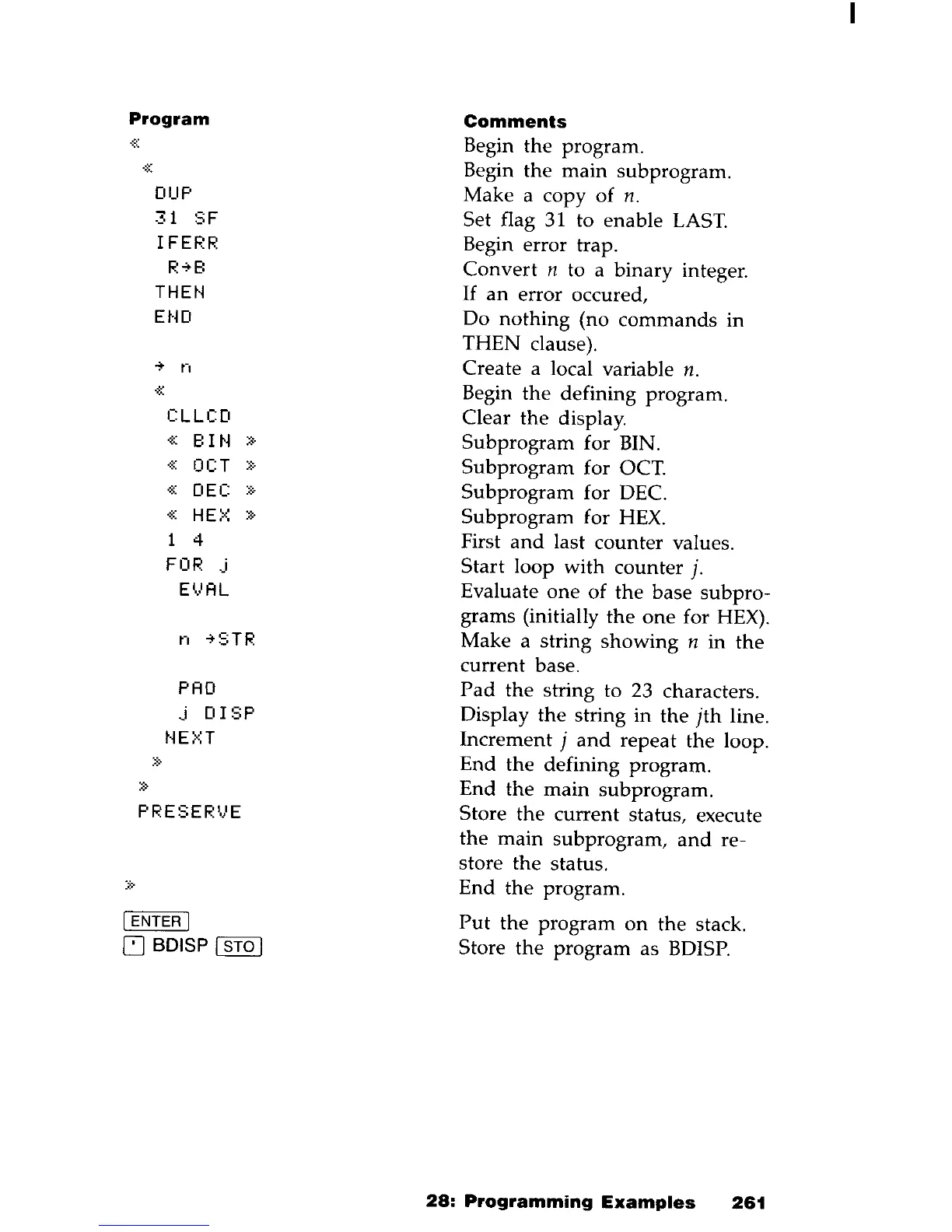
Program
Comments
.
:;::
Begin
the
program
.
.
:~:
Begin
the
main
subprogram
.
DUP
Make a copy
of
n.
31
SF
Set flag
31
to enable
LAST.
IFERR
Begin error trap.
R""B
Convert
n to a binary integer.
THEN
If
an
error occured,
EtW
Do
nothing
(no
commands
in
THEN clause).
..,.
n
Create a local variable n .
«
Begin
the
defining program.
CLLCD
Clear
the
display.
«
BIN
»
Subprogram
for BIN.
·K
OCT
»
Subprogram
for OCT.
«
DEC
::::-
Subprogram
for DEC.
%:
HEX
»
Subprogram
for
HEX.
4
First
and
last counter values.
FOR
.j
Start
loop with counter j.
EVAL
Evaluate
one
of
the
base
subpro-
grams (initially
the
one
for HEX).
n
""STR
Make a string
showing
n
in
the
current
base.
PAD
Pad
the
string to 23 characters.
.j
DISP
Display
the
string
in
the
jth
line .
t~E>n
Increment j
and
repeat
the
loop.
::::"
End
the
defining program.
»
End
the
main
subprogram.
PRESER'.}E
Store
the
current status, execute
the
main
subprogram,
and
re-
store
the
status.
:::-
..
End
the
program.
[ENTER
[
Put
the
program
on
the
stack.
~
BDISP [ STO I Store
the
program as BDISP.
28:
Programming
Examples
261

Table of Contents

Other manuals for HP HP-28S

Related product manuals