EasyManua.ls Logo

HP ProCurve J8766A - User Manual

HP ProCurve J8766A
124 pages
Print Icon
To Next Page IconTo Next Page
Loading...
i
Release Notes:
Version L.11.09 Software
for the ProCurve Series 4200vl Switches
Release L.11.09 supports these switches:
ProCurve Switch 4204vl (J8770A), 4208vl (J8773A), 4202vl-72 (J8772A), 4202vl-48G (J8771A),
4204vl-48GS (J9064A), 4208vl-72GS (J9030A), 4208vl-96 (J8775A), and 4208vl-64G (J8774A).
These release notes include information on the following:
Downloading switch software and documentation from the Web (page 1)
Support added for the ProCurve J8766A 10-GbE X2 vl Module (page 7)
Clarification of operating details for certain software features (page 8)
A listing of software enhancements in this release (page 18)
A listing of software fixes included in releases L.10.01 through L.11.09 (page 106)
Security Note:
Downloading and booting software release L.10.20 or greater for the first time automatically enables
SNMP access to the hpSwitchAuth MIB objects. If this is not desirable for your network, ProCurve
recommends that you disable it after downloading and rebooting with the latest switch software. For more
information, refer to “Switch Management Access Security” on page 8 and “Using SNMP To View and
Configure Switch Authentication Features” on page 51.
Related Publications
For the latest version of any of the publications listed below, visit the ProCurve Networking Web site
at www.procurve.com
. Click on Technical support, then Product manuals.
Management and Configuration Guide* (part number 5990-6050)
Advanced Traffic Management Guide* (part number 5990-6051)
Access Security Guide* (part number 5990-6052)
*Covers the ProCurve Series Series 6400cl, Series 5300xl, Series 4200vl, and Series 3400cl switches.

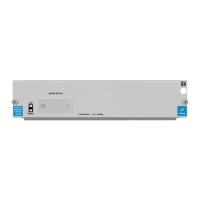
Table of Contents

Other manuals for HP ProCurve J8766A

Questions and Answers

  • P
    porterjesusAug 14, 2025
    How to troubleshoot no power on HP Switch?
    • L
      Loretta FloresAug 15, 2025
      If your HP Switch has no power, check the power cord at both ends to ensure it is securely plugged into the switch and a working power outlet. Try power cycling the switch by unplugging it and plugging it back in. Also, try plugging another device into the same outlet or using a different power cord to verify the power source.
  • M
    Melissa PerezAug 18, 2025
    What to do if there is no link on HP Switch port?
    • S
      Sandra KimAug 18, 2025
      If there's no link on a port of your HP Switch, first, verify that both ends of the network cable are securely connected to the switch and the connected device. Second, check that both the connected device and the switch are powered on and functioning correctly. Finally, for 1000 Mbps connections, make sure the network cable meets the IEEE 802.3ab standard.
  • J
    John DeckerAug 21, 2025
    Why is the port security disabling the port on my HP Switch?
    • M
      michellegonzalezAug 21, 2025
      If the link LED is flashing on your HP Switch, it means the network port has been disabled due to a security violation detected by the port security feature. The switch can be configured to disable a port whenever a security violation is detected.
  • C
    Connor MitchellAug 25, 2025
    What to do if the fan fails on HP Switch?
    • B
      Brenda OsborneAug 26, 2025
      If a fan fails on your HP Switch, try disconnecting the power, waiting a few moments, and then reconnecting it to see if the error clears. If the fan failure indication persists, it could mean one or more fans have failed. Ensure the ambient temperature is within normal room temperature.
  • K
    Kimberly EscobarAug 28, 2025
    What to do if power supply fails on HP Switch?
    • K
      Katie CabreraAug 28, 2025
      If the power supply fails on your HP Switch, first, verify that the power cord for the power supply is securely plugged into both the switch and a working power source. If it doesn't help, disconnect the AC power cord from the power supply, then try removing and reinstalling the power supply. Reconnect the power supply to the AC power source. If the error persists, the power supply may be faulty.
  • V
    valerieadkinsAug 31, 2025
    What to do if module self test fails on HP Switch?
    • M
      Mr. Michael Yu PhDAug 31, 2025
      If a module self-test fails on your HP Switch, try removing and reinstalling the module. If the fault indication continues, the module may be faulty. Remove the module and replace it with another one, or install a slot cover plate.
  • F
    Frederick ShermanSep 3, 2025
    What to do if module-based port self test fails on HP Switch?
    • G
      grantphillipsSep 3, 2025
      If a module-based port self-test fails on your HP Switch, try removing and reinstalling the module. If the port is a mini-GBIC, you can remove and reinstall the mini-GBIC without removing the entire module. If the port fault indication reoccurs, replace the mini-GBIC or the module.
  • K
    Kristin MurphySep 7, 2025
    What to do if fixed port self test fails on HP Switch?
    • M
      Maria TurnerSep 7, 2025
      To verify if a fixed port has failed on your HP Switch, try power-cycling the switch. If the port fault indication reoccurs, you will need to replace the switch.
  • T
    Tiffany CardenasSep 10, 2025
    What to do if self test fails on entire HP Switch?
    • J
      Jessica WheelerSep 12, 2025
      Try power cycling the HP Switch. If the fault indication reoccurs, the switch may have failed.

Summary

Software Management

Downloading Software to the Switch

Procedures for downloading switch software via TFTP or Xmodem transfer methods.

Enforcing Switch Security

Switch Management Access Security

Measures to secure access to switch status and configuration settings.

Local Manager Password

Setting a password to reduce unauthorized access via web or CLI interfaces.

Inbound Telnet Access and Web Browser Access

Securing remote access by using SSH and SSL/TLS protocols.

SNMP Access (Simple Network Management Protocol)

Controlling SNMP access to prevent unauthorized viewing or modification.

Network Access Security

Provisions to protect network access through the switch.

Access Control Lists (ACLs)

Using ACLs to permit or deny network traffic based on defined criteria.

Web and MAC Authentication

Port-based security using web or MAC address authentication for network access.

Secure Shell (SSH)

Using SSH for encrypted and authenticated remote access transactions.

802.1 X Access Control

Port-based authentication using RADIUS for controlled network access.

Port Security, MAC Lockdown, MAC Lockout, and IP Lockdown

Device-based security features controlling port and IP access.

Enhancements

Uni-Directional Link Detection (UDLD)

Feature to detect and block unidirectional link failures for network stability.

DHCP Snooping Overview

Using DHCP snooping to mitigate DoS attacks by inspecting DHCP packets.

Spanning Tree Per-Port BPDU Filtering

Controls spanning-tree participation on a per-port basis.

Spanning Tree BPDU Protection

Security enhancement to disable ports receiving spoofed BPDUs.

Adding SNMPv3 Users With AES

Configuring SNMPv3 users with AES privacy for secure network management.

Dynamic ARP Protection

Protects against ARP poisoning by validating IP-to-MAC bindings.

HP ProCurve J8766A Specifications

General IconGeneral
BrandHP
ModelProCurve J8766A
CategorySoftware
LanguageEnglish

Related product manuals